Summarize Data for Making Tables and Plots
summary.formula.Rdsummary.formula summarizes the variables listed in an S formula,
computing descriptive statistics (including ones in a
user-specified function). The summary statistics may be passed to
print methods, plot methods for making annotated dot charts, and
latex methods for typesetting tables using LaTeX.
summary.formula has three methods for computing descriptive
statistics on univariate or multivariate responses, subsetted by
categories of other variables. The method of summarization is
specified in the parameter method (see details below). For the
response and cross methods, the statistics used to
summarize the data
may be specified in a very flexible way (e.g., the geometric mean,
33rd percentile, Kaplan-Meier 2-year survival estimate, mixtures of
several statistics). The default summary statistic for these methods
is the mean (the proportion of positive responses for a binary
response variable). The cross method is useful for creating data
frames which contain summary statistics that are passed to trellis
as raw data (to make multi-panel dot charts, for example). The
print methods use the print.char.matrix function to print boxed
tables.
The right hand side of formula may contain mChoice
(“multiple choice”) variables. When test=TRUE each choice is
tested separately as a binary categorical response.
The plot method for method="reverse" creates a temporary
function Key in frame 0 as is done by the xYplot and
Ecdf.formula functions. After plot runs, you can type
Key() to put a legend in a default location, or
e.g. Key(locator(1)) to draw a legend where you click the left
mouse button. This key is for categorical variables, so to have the
opportunity to put the key on the graph you will probably want to use
the command plot(object, which="categorical"). A second function
Key2 is created if continuous variables are being plotted. It is
used the same as Key. If the which argument is not
specified to plot, two pages of plots will be produced. If you
don't define par(mfrow=) yourself,
plot.summary.formula.reverse will try to lay out a multi-panel
graph to best fit all the individual dot charts for continuous
variables.
There is a subscripting method for objects created with
method="response".
This can be used to print or plot selected variables or summary statistics
where there would otherwise be too many on one page.
cumcategory is a utility function useful when summarizing an ordinal
response variable. It converts such a variable having k levels to a
matrix with k-1 columns, where column i is a vector of zeros and
ones indicating that the categorical response is in level i+1 or
greater. When the left hand side of formula is cumcategory(y),
the default fun will summarize it by computing all of the relevant
cumulative proportions.
Functions conTestkw, catTestchisq, ordTestpo are
the default statistical test functions for summary.formula.
These defaults are: Wilcoxon-Kruskal-Wallis test for continuous
variables, Pearson chi-square test for categorical variables, and the
likelihood ratio chi-square test from the proportional odds model for
ordinal variables. These three functions serve also as templates for
the user to create her own testing functions that are self-defining in
terms of how the results are printed or rendered in LaTeX, or plotted.
Usage
# S3 method for class 'formula'
summary(formula, data=NULL, subset=NULL,
        na.action=NULL, fun = NULL,
        method = c("response", "reverse", "cross"),
        overall = method == "response" | method == "cross",
        continuous = 10, na.rm = TRUE, na.include = method != "reverse",
        g = 4, quant = c(0.025, 0.05, 0.125, 0.25, 0.375, 0.5, 0.625,
                         0.75, 0.875, 0.95, 0.975),
        nmin = if (method == "reverse") 100
               else 0,
        test = FALSE, conTest = conTestkw, catTest = catTestchisq,
        ordTest = ordTestpo, ...)

# S3 method for class 'summary.formula.response'
x[i, j, drop = FALSE]

# S3 method for class 'summary.formula.response'
print(x, vnames=c('labels','names'), prUnits=TRUE,
      abbreviate.dimnames=FALSE,
      prefix.width, min.colwidth, formatArgs=NULL, markdown=FALSE, ...)

# S3 method for class 'summary.formula.response'
plot(x, which = 1, vnames = c('labels','names'), xlim, xlab,
     pch = c(16, 1, 2, 17, 15, 3, 4, 5, 0), superposeStrata = TRUE,
     dotfont = 1, add = FALSE, reset.par = TRUE, main, subtitles = TRUE,
     ...)

# S3 method for class 'summary.formula.response'
latex(object, title = first.word(deparse(substitute(object))), caption,
      trios, vnames = c('labels', 'names'), prn = TRUE, prUnits = TRUE,
      rowlabel = '', cdec = 2, ncaption = TRUE, ...)

# S3 method for class 'summary.formula.reverse'
print(x, digits, prn = any(n != N), pctdig = 0,
      what=c('%', 'proportion'),
      npct = c('numerator', 'both', 'denominator', 'none'),
      exclude1 = TRUE, vnames = c('labels', 'names'), prUnits = TRUE,
      sep = '/', abbreviate.dimnames = FALSE,
      prefix.width = max(nchar(lab)), min.colwidth, formatArgs=NULL, round=NULL,
      prtest = c('P','stat','df','name'), prmsd = FALSE, long = FALSE,
      pdig = 3, eps = 0.001, ...)

# S3 method for class 'summary.formula.reverse'
plot(x, vnames = c('labels', 'names'), what = c('proportion', '%'),
     which = c('both', 'categorical', 'continuous'),
     xlim = if(what == 'proportion') c(0,1)
            else c(0,100),
     xlab = if(what=='proportion') 'Proportion'
            else 'Percentage',
     pch = c(16, 1, 2, 17, 15, 3, 4, 5, 0), exclude1 = TRUE,
     dotfont = 1, main,
     prtest = c('P', 'stat', 'df', 'name'), pdig = 3, eps = 0.001,
     conType = c('dot', 'bp', 'raw'), cex.means = 0.5, ...)

# S3 method for class 'summary.formula.reverse'
latex(object, title = first.word(deparse(substitute(object))), digits,
      prn = any(n != N), pctdig = 0, what=c('%', 'proportion'),
      npct = c("numerator", "both", "denominator", "slash", "none"),
      npct.size = 'scriptsize', Nsize = "scriptsize", exclude1 = TRUE,
      vnames=c("labels", "names"), prUnits = TRUE, middle.bold = FALSE,
      outer.size = "scriptsize", caption, rowlabel = "",
      insert.bottom = TRUE, dcolumn = FALSE, formatArgs=NULL, round = NULL,
      prtest = c('P', 'stat', 'df', 'name'), prmsd = FALSE,
      msdsize = NULL, long = dotchart, pdig = 3, eps = 0.001,
      auxCol = NULL, dotchart=FALSE, ...)

# S3 method for class 'summary.formula.cross'
print(x, twoway = nvar == 2, prnmiss = any(stats$Missing > 0), prn = TRUE,
      abbreviate.dimnames = FALSE, prefix.width = max(nchar(v)),
      min.colwidth, formatArgs = NULL, ...)

# S3 method for class 'summary.formula.cross'
latex(object, title = first.word(deparse(substitute(object))),
      twoway = nvar == 2, prnmiss = TRUE, prn = TRUE,
      caption=attr(object, "heading"), vnames=c("labels", "names"),
      rowlabel="", ...)

stratify(..., na.group = FALSE, shortlabel = TRUE)

# S3 method for class 'summary.formula.cross'
formula(x, ...)

cumcategory(y)

conTestkw(group, x)
catTestchisq(tab)
ordTestpo(group, x)
Arguments
- formula
An R formula with additive effects. For
method="response"or"cross", the dependent variable has the usual connotation. Formethod="reverse", the dependent variable is what is usually thought of as an independent variable, and it is one that is used to stratify all of the right hand side variables. Formethod="response"(only), theformulamay contain one or more invocations of thestratifyfunction whose arguments are defined below. This causes the entire analysis to be stratified by cross-classifications of the combined list of stratification factors. This stratification will be reflected as major column groupings in the resulting table, or as more response columns for plotting. Ifformulahas no dependent variablemethod="reverse"is the only legal value and somethoddefaults to"reverse"in this case.- x
an object created by
summary.formula. ForconTestkwa numeric vector, and forordTestpo, a numeric or factor variable that can be considered ordered- y
a numeric, character, category, or factor vector for
cumcategory. Is converted to a categorical variable is needed.- drop
logical. If
TRUEthe result is coerced to the lowest possible dimension.- data
name or number of a data frame. Default is the current frame.
- subset
a logical vector or integer vector of subscripts used to specify the subset of data to use in the analysis. The default is to use all observations in the data frame.
- na.action
function for handling missing data in the input data. The default is a function defined here called
na.retain, which keeps all observations for processing, with missing variables or not.- fun
function for summarizing data in each cell. Default is to take the mean of each column of the possibly multivariate response variable. You can specify
fun="%"to compute percentages (100 times the mean of a series of logical or binary variables). User–specified functions can also return a matrix. For example, you might compute quartiles on a bivariate response. Does not apply tomethod="reverse".- method
The default is
"response", in which case the response variable may be multivariate and any number of statistics may be used to summarize them. Here the responses are summarized separately for each of any number of independent variables. Continuous independent variables (see thecontinuousparameter below) are automatically stratified intog(see below) quantile groups (if you want to control the discretization for selected variables, use thecut2function on them). Otherwise, the data are subsetted by all levels of discrete right hand side variables. For multivariate responses, subjects are considered to be missing if any of the columns is missing.The
method="reverse"option is typically used to make baseline characteristic tables, for example. The single left hand side variable must be categorical (e.g., treatment), and the right hand side variables are broken down one at a time by the "dependent" variable. Continuous variables are described by three quantiles (quartiles by default) along with outer quantiles (used only for scaling x-axes when plotting quartiles; all are used when plotting box-percentile plots), and categorical ones are described by counts and percentages. If there is no left hand side variable,summaryassumes that there is only one group in the data, so that only one column of summaries will appear. If there is no dependent variable informula,methoddefaults to"reverse"automatically.The
method="cross"option allows for a multivariate dependent variable and for up to three independents. Continuous independent variables (those with at leastcontinuousunique values) are automatically divided intogquantile groups. The independents are cross-classified, and marginal statistics may optionally be computed. The output ofsummary.formulain this case is a data frame containing the independent variable combinations (with levels of"All"corresponding to marginals) and the corresponding summary statistics in the matrixS. The output data frame is suitable for direct use intrellis. Theprintandlatextypesetting methods for this method allows for a special two-way format if there are two right hand variables.- overall
For
method="reverse", settingoverall=TRUEmakes a new column with overall statistics for the whole sample. Formethod="cross",overall=TRUE(the default) results in all marginal statistics being computed. Fortrellisdisplays (usually multi-panel dot plots), these marginals just form other categories. For"response", the default isoverall=TRUE, causing a final row of global summary statistics to appear in tables and dot charts. Iftest=TRUEthese marginal statistics are ignored in doing statistical tests.- continuous
specifies the threshold for when a variable is considered to be continuous (when there are at least
continuousunique values).factorvariables are always considered to be categorical no matter how many levels they have.- na.rm
TRUE(the default) to excludeNAs before passing data tofunto compute statistics,FALSEotherwise.na.rm=FALSEis useful if the response variable is a matrix and you do not wish to exclude a row of the matrix if any of the columns in that row areNA.na.rmalso applies to summary statistic functions such assmean.cl.normal. For thesena.rmdefaults toTRUEunlike built-in functions.- na.include
for
method="response", setna.include=FALSEto exclude missing values from being counted as their own category when subsetting the response(s) by levels of a categorical variable. Formethod="reverse"setna.include=TRUEto keep missing values of categorical variables from being excluded from the table.- g
number of quantile groups to use when variables are automatically categorized with
method="response"or"cross"usingcut2- nmin
if fewer than
nminobservations exist in a category for"response"(over all strata combined), that category will be ignored. For"reverse", for categories of the response variable in which there are less than or equal tonminnon-missing observations, the raw data are retained for later plotting in place of box plots.- test
applies if
method="reverse". Set toTRUEto compute test statistics using tests specified inconTestandcatTest.- conTest
a function of two arguments (grouping variable and a continuous variable) that returns a list with components
P(the computed P-value),stat(the test statistic, either chi-square or F),df(degrees of freedom),testname(test name),statname(statistic name),namefun("chisq", "fstat"), an optional componentlatexstat(LaTeX representation ofstatname), an optional componentplotmathstat(for R - theplotmathrepresentation ofstatname, as a character string), and an optional componentnotethat contains a character string note about the test (e.g.,"test not done because n < 5").conTestis applied to continuous variables on the right-hand-side of the formula whenmethod="reverse". The default uses thespearman2function to run the Wilcoxon or Kruskal-Wallis test using the F distribution.- catTest
a function of a frequency table (an integer matrix) that returns a list with the same components as created by
conTest. By default, the Pearson chi-square test is done, without continuity correction (the continuity correction would make the test conservative like the Fisher exact test).- ordTest
a function of a frequency table (an integer matrix) that returns a list with the same components as created by
conTest. By default, the Proportional odds likelihood ratio test is done.- ...
for
summary.formulathese are optional arguments forcut2when variables are automatically categorized. Forplotmethods these arguments are passed todotchart2. ForKeyandKey2these arguments are passed tokey,text, ormtitle. Forprintmethods these are optional arguments toprint.char.matrix. Forlatexmethods these are passed tolatex.default. One of the most important of these isfile. Specifyingfile=""will cause LaTeX code to just be printed to standard output rather than be stored in a permanent file.- object
an object created by
summary.formula- quant
vector of quantiles to use for summarizing data with
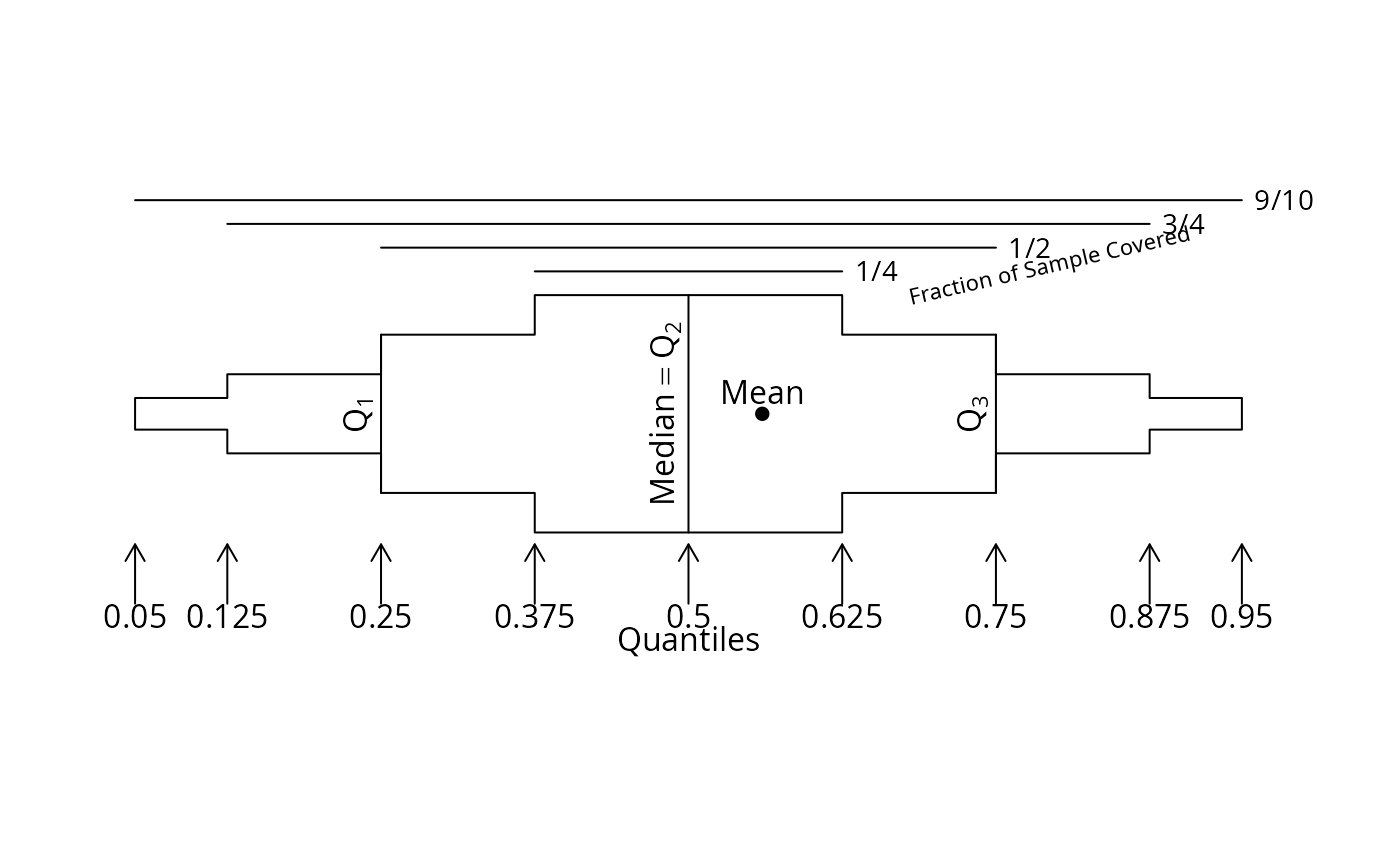
method="reverse". This must be numbers between 0 and 1 inclusive and must include the numbers 0.5, 0.25, and 0.75 which are used for printing and for plotting quantile intervals. The outer quantiles are used for scaling the x-axes for such plots. Specify outer quantiles as0and1to scale the x-axes using the whole observed data ranges instead of the default (a 0.95 quantile interval). Box-percentile plots are drawn using all but the outer quantiles.- vnames
By default, tables and plots are usually labeled with variable labels (see the
labelandsas.getfunctions). To use the shorter variable names, specifyvnames="name".- pch
vector of plotting characters to represent different groups, in order of group levels. For
method="response"the characters correspond to levels of thestratifyvariable ifsuperposeStrata=TRUE, and if nostrataare used or ifsuperposeStrata=FALSE, thepchvector corresponds to thewhichargument formethod="response".- superposeStrata
If
stratifywas used, setsuperposeStrata=FALSEto make separate dot charts for each level of thestratificationvariable, formethod='response'. The default is to superposition all strata on one dot chart.- dotfont
font for plotting points
- reset.par
set to
FALSEto suppress the restoring of the old par values inplot.summary.formula.response- abbreviate.dimnames
see
print.char.matrix- prefix.width
see
print.char.matrix- min.colwidth
minimum column width to use for boxes printed with
print.char.matrix. The default is the maximum of the minimum column label length and the minimum length of entries in the data cells.- formatArgs
a list containing other arguments to pass to
format.defaultsuch asscientific, e.g.,formatArgs=list(scientific=c(-5,5)). Forprint.summary.formula.reverseandformat.summary.formula.reverse,formatArgsapplies only to statistics computed on continuous variables, not to percents, numerators, and denominators. Theroundargument may be preferred.- markdown
for
print.summary.formula.responseset toTRUEto useknitr::kableto produce the table in markdown format rather than using raw text output created byprint.char.matrix- digits
number of significant digits to print. Default is to use the current value of the
digitssystem option.- prn
set to
TRUEto print the number of non-missing observations on the current (row) variable. The default is to print these only if any of the counts of non-missing values differs from the total number of non-missing values of the left-hand-side variable. Formethod="cross"the default is to always printN.- prnmiss
set to
FALSEto suppress printing counts of missing values for"cross"- what
for
method="reverse"specifies whether proportions or percentages are to be plotted- pctdig
number of digits to the right of the decimal place for printing percentages. The default is zero, so percents will be rounded to the nearest percent.
- npct
specifies which counts are to be printed to the right of percentages. The default is to print the frequency (numerator of the percent) in parentheses. You can specify
"both"to print both numerator and denominator,"denominator","slash"to typeset horizontally using a forward slash, or"none".- npct.size
the size for typesetting
npctinformation which appears after percents. The default is"scriptsize".- Nsize
When a second row of column headings is added showing sample sizes,
Nsizespecifies the LaTeX size for these subheadings. Default is"scriptsize".- exclude1
by default,
method="reverse"objects will be printed, plotted, or typeset by removing redundant entries from percentage tables for categorical variables. For example, if you print the percent of females, you don't need to print the percent of males. To override this, setexclude1=FALSE.- prUnits
set to
FALSEto suppress printing or latexingunitsattributes of variables, whenmethod='reverse'or'response'- sep
character to use to separate quantiles when printing
method="reverse"tables- prtest
a vector of test statistic components to print if
test=TRUEwas in effect whensummary.formulawas called. Defaults to printing all components. Specifyprtest=FALSEorprtest="none"to not print any tests. This applies toprint,latex, andplotmethods formethod='reverse'.- round
for
print.summary.formula.reverseandlatex.summary.formula.reversespecifyroundto round the quantiles and optional mean and standard deviation torounddigits after the decimal point- prmsd
set to
TRUEto print mean and SD after the three quantiles, for continuous variables withmethod="reverse"- msdsize
defaults to
NULLto use the current font size for the mean and standard deviation ifprmsdisTRUE. Set to a character string to specify an alternate LaTeX font size.- long
set to
TRUEto print the results for the first category on its own line, not on the same line with the variable label (formethod="reverse"withprintandlatexmethods)- pdig
number of digits to the right of the decimal place for printing P-values. Default is
3. This is passed toformat.pval.- eps
P-values less than
epswill be printed as< eps. Seeformat.pval.- auxCol
an optional auxiliary column of information, right justified, to add in front of statistics typeset by
latex.summary.formula.reverse. This argument is a list with a single element that has a name specifying the column heading. If this name includes a newline character, the portions of the string before and after the newline form respectively the main heading and the subheading (typically set in smaller font), respectively. See theextracolheadsargument tolatex.default.auxColis filled with blanks when a variable being summarized takes up more than one row in the output. This happens with categorical variables.- twoway
for
method="cross"with two right hand side variables,twowaycontrols whether the resulting table will be printed in enumeration format or as a two-way table (the default)- which
For
method="response"specifies the sequential number or a vector of subscripts of statistics to plot. If you had anystratifyvariables, these are counted as if more statistics were computed. Formethod="reverse"specifies whether to plot results for categorical variables, continuous variables, or both (the default).- conType
For plotting
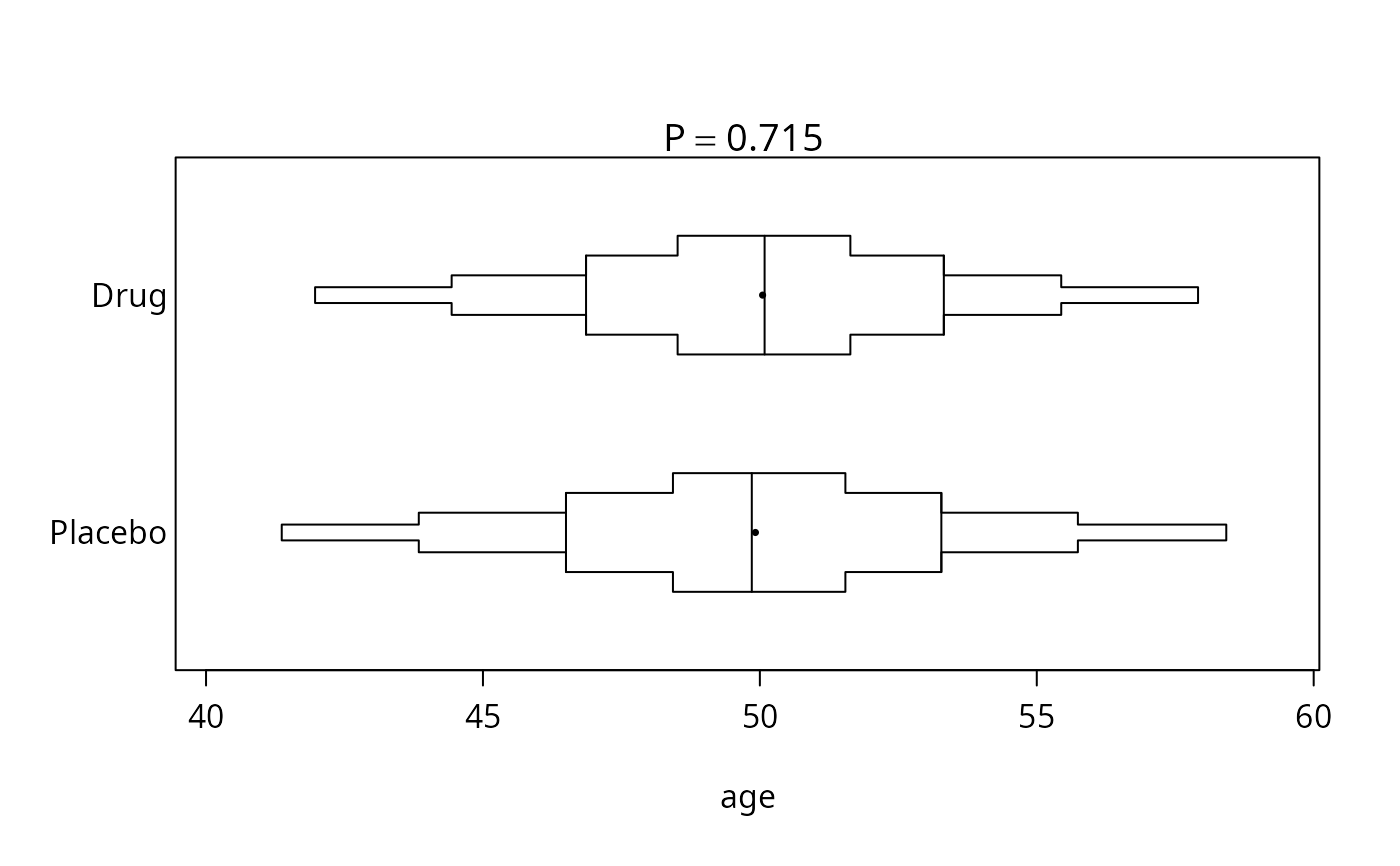
method="reverse"plots for continuous variables, dot plots showing quartiles are drawn by default. SpecifyconType='bp'to draw box-percentile plots using all the quantiles inquantexcept the outermost ones. Means are drawn with a solid dot and vertical reference lines are placed at the three quartiles. SpecifyconType='raw'to make a strip chart showing the raw data. This can only be used if the sample size for each left-hand-side group is less than or equal tonmin.- cex.means
character size for means in box-percentile plots; default is .5
- xlim
vector of length two specifying x-axis limits. For
method="reverse", this is only used for plotting categorical variables. Limits for continuous variables are determined by the outer quantiles specified inquant.- xlab
x-axis label
- add
set to
TRUEto add to an existing plot- main
a main title. For
method="reverse"this applies only to the plot for categorical variables.- subtitles
set to
FALSEto suppress automatic subtitles- caption
character string containing LaTeX table captions.
- title
name of resulting LaTeX file omitting the
.texsuffix. Default is the name of thesummaryobject. Ifcaptionis specied,titleis also used for the table's symbolic reference label.- trios
If for
method="response"you summarized the response(s) by using three quantiles, specifytrios=TRUEortrios=vto group each set of three statistics into one column forlatexoutput, using the format a B c, where the outer quantiles are in smaller font (scriptsize). Fortrios=TRUE, the overall column names are taken from the column names of the original data matrix. To give new column names, specifytrios=v, wherevis a vector of column names, of lengthm/3, wheremis the original number of columns of summary statistics.- rowlabel
see
latex.default(under the help filelatex)- cdec
number of decimal places to the right of the decimal point for
latex. This value should be a scalar (which will be properly replicated), or a vector with length equal to the number of columns in the table. For"response"tables, this length does not count the column forN.- ncaption
set to
FALSEto not havelatex.summary.formula.responseput sample sizes in captions- i
a vector of integers, or character strings containing variable names to subset on. Note that each row subsetted on in an
summary.formula.reverseobject subsets on all the levels that make up the corresponding variable (automatically).- j
a vector of integers representing column numbers
- middle.bold
set to
TRUEto have LaTeX use bold face for the middle quantile formethod="reverse"- outer.size
the font size for outer quantiles for
"reverse"tables- insert.bottom
set to
FALSEto suppress inclusion of definitions placed at the bottom of LaTeX tables formethod="reverse"- dcolumn
see
latex- na.group
set to
TRUEto have missing stratification variables given their own category (NA)- shortlabel
set to
FALSEto include stratification variable names and equal signs in labels for strata levels- dotchart
set to
TRUEto output a dotchart in the latex table being generated.- group
for
conTestandordTest, a numeric or factor variable with length the same asx- tab
for
catTest, a frequency table such as that created bytable()
Value
summary.formula returns a data frame or list depending on
method. plot.summary.formula.reverse returns the number
of pages of plots that were made.
Side Effects
plot.summary.formula.reverse creates a function Key and
Key2 in frame 0 that will draw legends.
Author
Frank Harrell
Department of Biostatistics
Vanderbilt University
fh@fharrell.com
References
Harrell FE (2007): Statistical tables and plots using S and LaTeX. Document available from https://hbiostat.org/R/Hmisc/summary.pdf.
Examples
options(digits=3)
set.seed(173)
sex <- factor(sample(c("m","f"), 500, rep=TRUE))
age <- rnorm(500, 50, 5)
treatment <- factor(sample(c("Drug","Placebo"), 500, rep=TRUE))
# Generate a 3-choice variable; each of 3 variables has 5 possible levels
symp <- c('Headache','Stomach Ache','Hangnail',
'Muscle Ache','Depressed')
symptom1 <- sample(symp, 500,TRUE)
symptom2 <- sample(symp, 500,TRUE)
symptom3 <- sample(symp, 500,TRUE)
Symptoms <- mChoice(symptom1, symptom2, symptom3, label='Primary Symptoms')
table(Symptoms)
#> Symptoms
#> 1 1;2 1;2;3 1;2;4 1;2;5 1;3 1;3;4 1;3;5 1;4 1;4;5 1;5 2 2;3
#> 0 0 0 0 0 0 0 0 0 0 0 0 0
#> 2;3;4 2;3;5 2;4 2;4;5 2;5 3 3;4 3;4;5 3;5 4 4;5 5
#> 0 0 0 0 0 0 0 0 0 0 0 0
# Note: In this example, some subjects have the same symptom checked
# multiple times; in practice these redundant selections would be NAs
# mChoice will ignore these redundant selections
#Frequency table sex*treatment, sex*Symptoms
summary(sex ~ treatment + Symptoms, fun=table)
#> sex N= 500
#>
#> +---------+------------+---+---+---+
#> | | | N| f| m|
#> +---------+------------+---+---+---+
#> |treatment| Drug|246|121|125|
#> | | Placebo|254|120|134|
#> +---------+------------+---+---+---+
#> | Symptoms| Muscle Ache|229|108|121|
#> | |Stomach Ache|248|121|127|
#> | | Hangnail|262|125|137|
#> | | Headache|253|119|134|
#> | | Depressed|245|127|118|
#> +---------+------------+---+---+---+
#> | Overall| |500|241|259|
#> +---------+------------+---+---+---+
# could also do summary(sex ~ treatment +
# mChoice(symptom1,symptom2,symptom3), fun=table)
#Compute mean age, separately by 3 variables
summary(age ~ sex + treatment + Symptoms)
#> age N= 500
#>
#> +---------+------------+---+----+
#> | | | N| age|
#> +---------+------------+---+----+
#> | sex| f|241|49.7|
#> | | m|259|50.3|
#> +---------+------------+---+----+
#> |treatment| Drug|246|50.0|
#> | | Placebo|254|49.9|
#> +---------+------------+---+----+
#> | Symptoms| Muscle Ache|229|50.6|
#> | |Stomach Ache|248|50.0|
#> | | Hangnail|262|49.8|
#> | | Headache|253|50.0|
#> | | Depressed|245|49.9|
#> +---------+------------+---+----+
#> | Overall| |500|50.0|
#> +---------+------------+---+----+
f <- summary(treatment ~ age + sex + Symptoms, method="reverse", test=TRUE)
f
#>
#>
#> Descriptive Statistics by treatment
#>
#> +------------------------------+----------------------+----------------------+------------------------------+
#> | |Drug |Placebo | Test |
#> | |(N=246) |(N=254) |Statistic |
#> +------------------------------+----------------------+----------------------+------------------------------+
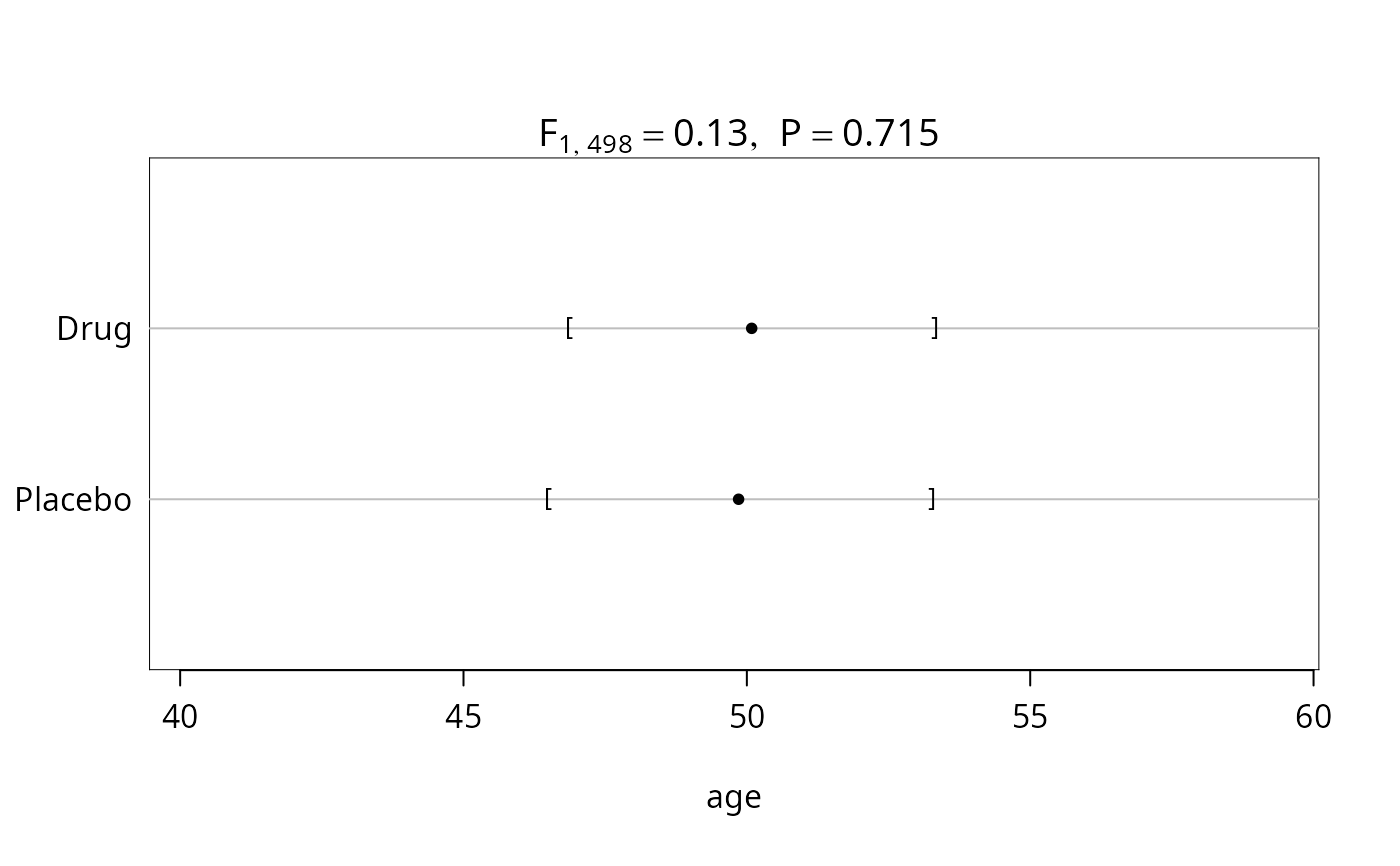
#> |age | 46.9/50.1/53.3| 46.5/49.9/53.3| F=0.13 d.f.=1,498 P=0.715 |
#> +------------------------------+----------------------+----------------------+------------------------------+
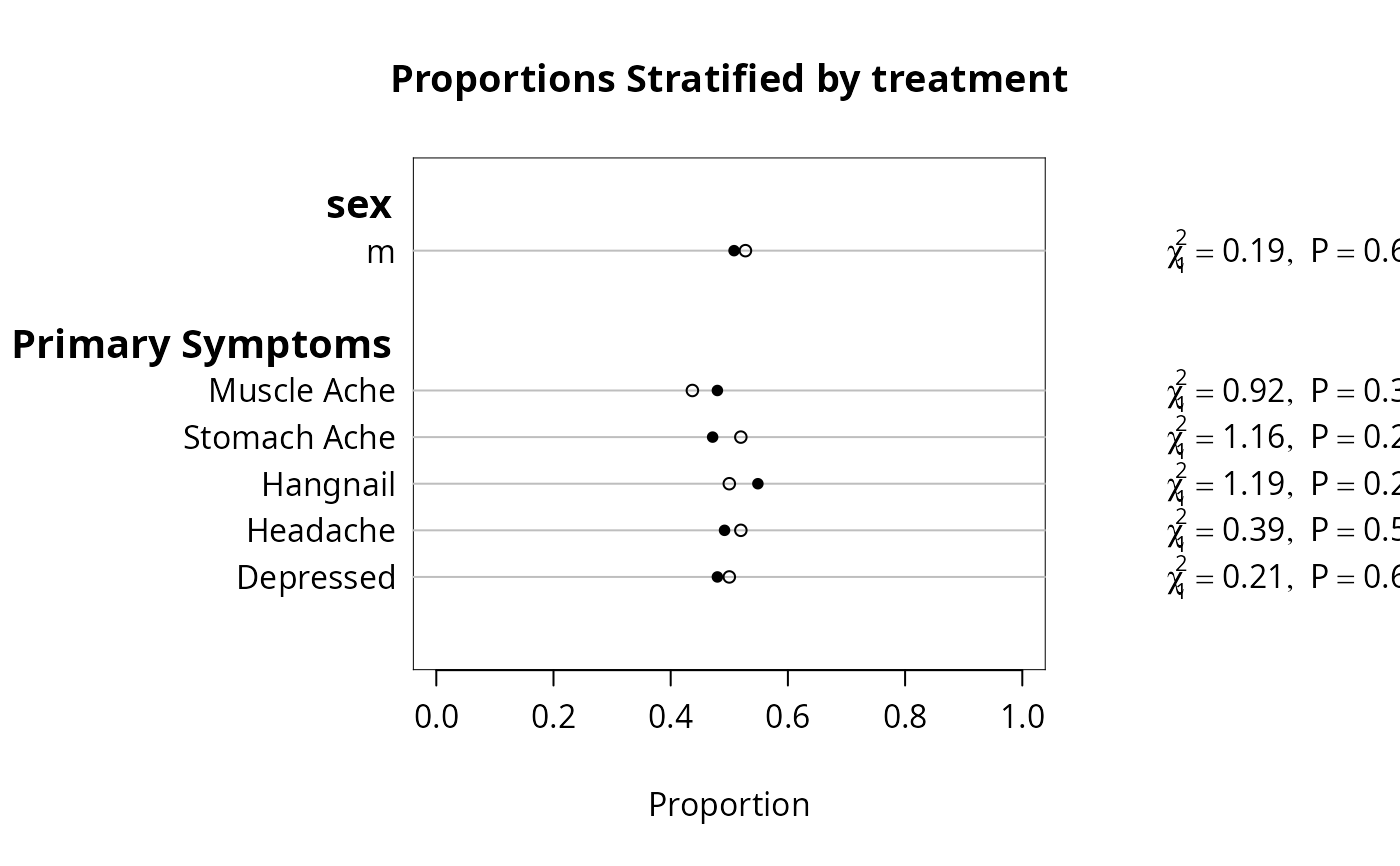
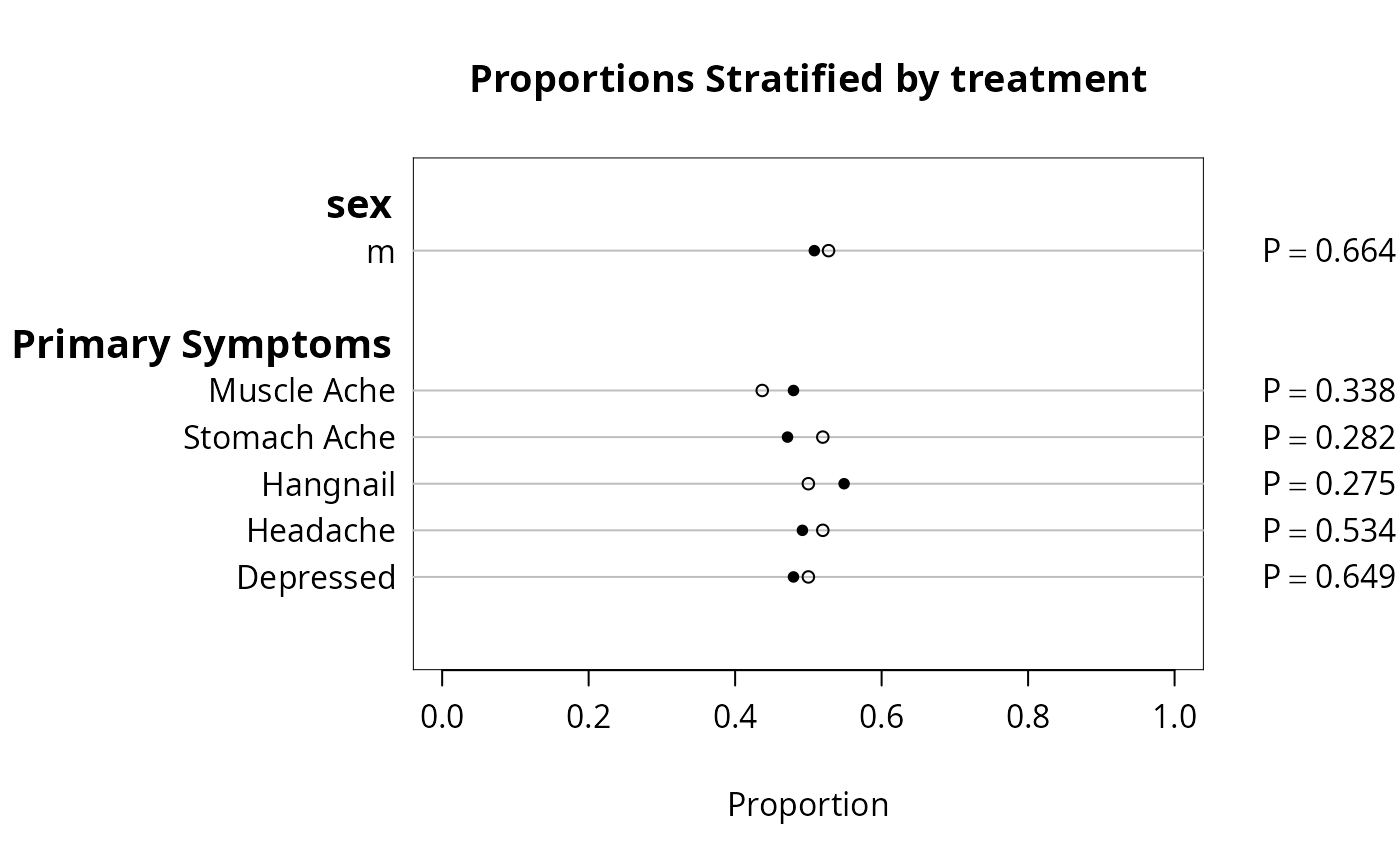
#> |sex : m | 51% (125) | 53% (134) |Chi-square=0.19 d.f.=1 P=0.664|
#> +------------------------------+----------------------+----------------------+------------------------------+
#> |Primary Symptoms : Muscle Ache| 48% (118) | 44% (111) |Chi-square=0.92 d.f.=1 P=0.338|
#> +------------------------------+----------------------+----------------------+------------------------------+
#> | Stomach Ache | 47% (116) | 52% (132) |Chi-square=1.16 d.f.=1 P=0.282|
#> +------------------------------+----------------------+----------------------+------------------------------+
#> | Hangnail | 55% (135) | 50% (127) |Chi-square=1.19 d.f.=1 P=0.275|
#> +------------------------------+----------------------+----------------------+------------------------------+
#> | Headache | 49% (121) | 52% (132) |Chi-square=0.39 d.f.=1 P=0.534|
#> +------------------------------+----------------------+----------------------+------------------------------+
#> | Depressed | 48% (118) | 50% (127) |Chi-square=0.21 d.f.=1 P=0.649|
#> +------------------------------+----------------------+----------------------+------------------------------+
# trio of numbers represent 25th, 50th, 75th percentile
print(f, long=TRUE)
#>
#>
#> Descriptive Statistics by treatment
#>
#> +----------------+----------------------+----------------------+------------------------------+
#> | |Drug |Placebo | Test |
#> | |(N=246) |(N=254) |Statistic |
#> +----------------+----------------------+----------------------+------------------------------+
#> |age | 46.9/50.1/53.3| 46.5/49.9/53.3| F=0.13 d.f.=1,498 P=0.715 |
#> +----------------+----------------------+----------------------+------------------------------+
#> |sex | | |Chi-square=0.19 d.f.=1 P=0.664|
#> +----------------+----------------------+----------------------+------------------------------+
#> | m | 51% (125) | 53% (134) | |
#> +----------------+----------------------+----------------------+------------------------------+
#> |Primary Symptoms| | | |
#> +----------------+----------------------+----------------------+------------------------------+
#> | Muscle Ache | 48% (118) | 44% (111) |Chi-square=0.92 d.f.=1 P=0.338|
#> +----------------+----------------------+----------------------+------------------------------+
#> | Stomach Ache| 47% (116) | 52% (132) |Chi-square=1.16 d.f.=1 P=0.282|
#> +----------------+----------------------+----------------------+------------------------------+
#> | Hangnail | 55% (135) | 50% (127) |Chi-square=1.19 d.f.=1 P=0.275|
#> +----------------+----------------------+----------------------+------------------------------+
#> | Headache | 49% (121) | 52% (132) |Chi-square=0.39 d.f.=1 P=0.534|
#> +----------------+----------------------+----------------------+------------------------------+
#> | Depressed | 48% (118) | 50% (127) |Chi-square=0.21 d.f.=1 P=0.649|
#> +----------------+----------------------+----------------------+------------------------------+
plot(f)
 plot(f, conType='bp', prtest='P')
 bpplt() # annotated example showing layout of bp plot
 #Compute predicted probability from a logistic regression model
#For different stratifications compute receiver operating
#characteristic curve areas (C-indexes)
predicted <- plogis(.4*(sex=="m")+.15*(age-50))
positive.diagnosis <- ifelse(runif(500)<=predicted, 1, 0)
roc <- function(z) {
x <- z[,1];
y <- z[,2];
n <- length(x);
if(n<2)return(c(ROC=NA));
n1 <- sum(y==1);
c(ROC= (mean(rank(x)[y==1])-(n1+1)/2)/(n-n1) );
}
y <- cbind(predicted, positive.diagnosis)
options(digits=2)
summary(y ~ age + sex, fun=roc)
#> y N= 500
#>
#> +-------+-----------+---+----+
#> | | | N| ROC|
#> +-------+-----------+---+----+
#> | age|[36.8,46.7)|125|0.60|
#> | |[46.7,50.0)|125|0.55|
#> | |[50.0,53.3)|125|0.62|
#> | |[53.3,67.5]|125|0.62|
#> +-------+-----------+---+----+
#> | sex| f|241|0.72|
#> | | m|259|0.70|
#> +-------+-----------+---+----+
#> |Overall| |500|0.72|
#> +-------+-----------+---+----+
options(digits=3)
summary(y ~ age + sex, fun=roc, method="cross")
#>
#> roc by age, sex
#>
#> +-+
#> |N|
#> |y|
#> +-+
#> +-----------+-----+-----+-----+
#> | age | f | m | ALL |
#> +-----------+-----+-----+-----+
#> |[36.8,46.7)| 65| 60| 125|
#> | |0.526|0.626|0.598|
#> +-----------+-----+-----+-----+
#> |[46.7,50.0)| 65| 60| 125|
#> | |0.588|0.467|0.554|
#> +-----------+-----+-----+-----+
#> |[50.0,53.3)| 53| 72| 125|
#> | |0.567|0.652|0.622|
#> +-----------+-----+-----+-----+
#> |[53.3,67.5]| 58| 67| 125|
#> | |0.646|0.622|0.618|
#> +-----------+-----+-----+-----+
#> | ALL| 241| 259| 500|
#> | |0.718|0.704|0.716|
#> +-----------+-----+-----+-----+
#Use stratify() to produce a table in which time intervals go down the
#page and going across 3 continuous variables are summarized using
#quartiles, and are stratified by two treatments
set.seed(1)
d <- expand.grid(visit=1:5, treat=c('A','B'), reps=1:100)
d$sysbp <- rnorm(100*5*2, 120, 10)
label(d$sysbp) <- 'Systolic BP'
d$diasbp <- rnorm(100*5*2, 80, 7)
d$diasbp[1] <- NA
d$age <- rnorm(100*5*2, 50, 12)
g <- function(y) {
N <- apply(y, 2, function(w) sum(!is.na(w)))
h <- function(x) {
qu <- quantile(x, c(.25,.5,.75), na.rm=TRUE)
names(qu) <- c('Q1','Q2','Q3')
c(N=sum(!is.na(x)), qu)
}
w <- as.vector(apply(y, 2, h))
names(w) <- as.vector( outer(c('N','Q1','Q2','Q3'), dimnames(y)[[2]],
function(x,y) paste(y,x)))
w
}
#Use na.rm=FALSE to count NAs separately by column
s <- summary(cbind(age,sysbp,diasbp) ~ visit + stratify(treat),
na.rm=FALSE, fun=g, data=d)
#The result is very wide. Re-do, putting treatment vertically
x <- with(d, factor(paste('Visit', visit, treat)))
summary(cbind(age,sysbp,diasbp) ~ x, na.rm=FALSE, fun=g, data=d)
#> cbind(age, sysbp, diasbp) N= 1000
#>
#> +-------+---------+----+-----+------+------+------+-------+--------+--------+--------+--------+---------+---------+---------+
#> | | | N|age N|age Q1|age Q2|age Q3|sysbp N|sysbp Q1|sysbp Q2|sysbp Q3|diasbp N|diasbp Q1|diasbp Q2|diasbp Q3|
#> +-------+---------+----+-----+------+------+------+-------+--------+--------+--------+--------+---------+---------+---------+
#> | x|Visit 1 A| 100| 100| 43.6| 49.8| 59.5| 100| 113| 118| 127| 99| 75.6| 79.3| 83.4|
#> | |Visit 1 B| 100| 100| 42.1| 49.1| 56.5| 100| 111| 119| 127| 100| 75.8| 79.6| 84.1|
#> | |Visit 2 A| 100| 100| 41.6| 48.1| 58.3| 100| 116| 122| 129| 100| 76.7| 79.9| 85.1|
#> | |Visit 2 B| 100| 100| 43.3| 49.9| 58.0| 100| 113| 119| 127| 100| 73.4| 79.2| 86.0|
#> | |Visit 3 A| 100| 100| 43.8| 51.0| 61.8| 100| 113| 120| 127| 100| 73.9| 78.9| 83.5|
#> | |Visit 3 B| 100| 100| 42.3| 50.3| 58.9| 100| 115| 120| 127| 100| 75.8| 79.5| 85.3|
#> | |Visit 4 A| 100| 100| 44.9| 50.1| 58.6| 100| 111| 117| 122| 100| 74.6| 81.4| 86.1|
#> | |Visit 4 B| 100| 100| 38.6| 47.2| 56.2| 100| 113| 120| 126| 100| 74.3| 79.5| 84.7|
#> | |Visit 5 A| 100| 100| 46.2| 52.1| 57.6| 100| 114| 120| 127| 100| 74.8| 80.6| 85.3|
#> | |Visit 5 B| 100| 100| 39.2| 49.1| 59.5| 100| 115| 120| 127| 100| 76.9| 80.0| 84.5|
#> +-------+---------+----+-----+------+------+------+-------+--------+--------+--------+--------+---------+---------+---------+
#> |Overall| |1000| 1000| 42.4| 49.9| 58.6| 1000| 113| 120| 127| 999| 75.1| 79.8| 85.2|
#> +-------+---------+----+-----+------+------+------+-------+--------+--------+--------+--------+---------+---------+---------+
#Compose LaTeX code directly
g <- function(y) {
h <- function(x) {
qu <- format(round(quantile(x, c(.25,.5,.75), na.rm=TRUE),1),nsmall=1)
paste('{\\scriptsize(',sum(!is.na(x)),
')} \\hfill{\\scriptsize ', qu[1], '} \\textbf{', qu[2],
'} {\\scriptsize ', qu[3],'}', sep='')
}
apply(y, 2, h)
}
s <- summary(cbind(age,sysbp,diasbp) ~ visit + stratify(treat),
na.rm=FALSE, fun=g, data=d)
# latex(s, prn=FALSE)
## need option in latex to not print n
#Put treatment vertically
s <- summary(cbind(age,sysbp,diasbp) ~ x, fun=g, data=d, na.rm=FALSE)
# latex(s, prn=FALSE)
#Plot estimated mean life length (assuming an exponential distribution)
#separately by levels of 4 other variables. Repeat the analysis
#by levels of a stratification variable, drug. Automatically break
#continuous variables into tertiles.
#We are using the default, method='response'
if (FALSE) { # \dontrun{
life.expect <- function(y) c(Years=sum(y[,1])/sum(y[,2]))
attach(pbc)
require(survival)
S <- Surv(follow.up.time, death)
s2 <- summary(S ~ age + albumin + ascites + edema + stratify(drug),
fun=life.expect, g=3)
#Note: You can summarize other response variables using the same
#independent variables using e.g. update(s2, response~.), or you
#can change the list of independent variables using e.g.
#update(s2, response ~.- ascites) or update(s2, .~.-ascites)
#You can also print, typeset, or plot subsets of s2, e.g.
#plot(s2[c('age','albumin'),]) or plot(s2[1:2,])
s2 # invokes print.summary.formula.response
#Plot results as a separate dot chart for each of the 3 strata levels
par(mfrow=c(2,2))
plot(s2, cex.labels=.6, xlim=c(0,40), superposeStrata=FALSE)
#Typeset table, creating s2.tex
w <- latex(s2, cdec=1)
#Typeset table but just print LaTeX code
latex(s2, file="") # useful for Sweave
#Take control of groups used for age. Compute 3 quartiles for
#both cholesterol and bilirubin (excluding observations that are missing
#on EITHER ONE)
age.groups <- cut2(age, c(45,60))
g <- function(y) apply(y, 2, quantile, c(.25,.5,.75))
y <- cbind(Chol=chol,Bili=bili)
label(y) <- 'Cholesterol and Bilirubin'
#You can give new column names that are not legal S names
#by enclosing them in quotes, e.g. 'Chol (mg/dl)'=chol
s <- summary(y ~ age.groups + ascites, fun=g)
par(mfrow=c(1,2), oma=c(3,0,3,0)) # allow outer margins for overall
for(ivar in 1:2) { # title
isub <- (1:3)+(ivar-1)*3 # *3=number of quantiles/var.
plot(s3, which=isub, main='',
xlab=c('Cholesterol','Bilirubin')[ivar],
pch=c(91,16,93)) # [, closed circle, ]
}
mtext(paste('Quartiles of', label(y)), adj=.5, outer=TRUE, cex=1.75)
#Overall (outer) title
prlatex(latex(s3, trios=TRUE))
# trios -> collapse 3 quartiles
#Summarize only bilirubin, but do it with two statistics:
#the mean and the median. Make separate tables for the two randomized
#groups and make plots for the active arm.
g <- function(y) c(Mean=mean(y), Median=median(y))
for(sub in c("D-penicillamine", "placebo")) {
ss <- summary(bili ~ age.groups + ascites + chol, fun=g,
subset=drug==sub)
cat('\n',sub,'\n\n')
print(ss)
if(sub=='D-penicillamine') {
par(mfrow=c(1,1))
plot(s4, which=1:2, dotfont=c(1,-1), subtitles=FALSE, main='')
#1=mean, 2=median -1 font = open circle
title(sub='Closed circle: mean; Open circle: median', adj=0)
title(sub=sub, adj=1)
}
w <- latex(ss, append=TRUE, fi='my.tex',
label=if(sub=='placebo') 's4b' else 's4a',
caption=paste(label(bili),' {\\em (',sub,')}', sep=''))
#Note symbolic labels for tables for two subsets: s4a, s4b
prlatex(w)
}
#Now consider examples in 'reverse' format, where the lone dependent
#variable tells the summary function how to stratify all the
#'independent' variables. This is typically used to make tables
#comparing baseline variables by treatment group, for example.
s5 <- summary(drug ~ bili + albumin + stage + protime + sex +
age + spiders,
method='reverse')
#To summarize all variables, use summary(drug ~., data=pbc)
#To summarize all variables with no stratification, use
#summary(~a+b+c) or summary(~.,data=\dots)
options(digits=1)
print(s5, npct='both')
#npct='both' : print both numerators and denominators
plot(s5, which='categorical')
Key(locator(1)) # draw legend at mouse click
par(oma=c(3,0,0,0)) # leave outer margin at bottom
plot(s5, which='continuous')
Key2() # draw legend at lower left corner of plot
# oma= above makes this default key fit the page better
options(digits=3)
w <- latex(s5, npct='both', here=TRUE)
# creates s5.tex
#Turn to a different dataset and do cross-classifications on possibly
#more than one independent variable. The summary function with
#method='cross' produces a data frame containing the cross-
#classifications. This data frame is suitable for multi-panel
#trellis displays, although `summarize' works better for that.
attach(prostate)
size.quartile <- cut2(sz, g=4)
bone <- factor(bm,labels=c("no mets","bone mets"))
s7 <- summary(ap>1 ~ size.quartile + bone, method='cross')
#In this case, quartiles are the default so could have said sz + bone
options(digits=3)
print(s7, twoway=FALSE)
s7 # same as print(s7)
w <- latex(s7, here=TRUE) # Make s7.tex
library(trellis,TRUE)
invisible(ps.options(reset=TRUE))
trellis.device(postscript, file='demo2.ps')
dotplot(S ~ size.quartile|bone, data=s7, #s7 is name of summary stats
xlab="Fraction ap>1", ylab="Quartile of Tumor Size")
#Can do this more quickly with summarize:
# s7 <- summarize(ap>1, llist(size=cut2(sz, g=4), bone), mean,
# stat.name='Proportion')
# dotplot(Proportion ~ size | bone, data=s7)
summary(age ~ stage, method='cross')
summary(age ~ stage, fun=quantile, method='cross')
summary(age ~ stage, fun=smean.sd, method='cross')
summary(age ~ stage, fun=smedian.hilow, method='cross')
summary(age ~ stage, fun=function(x) c(Mean=mean(x), Median=median(x)),
method='cross')
#The next statements print real two-way tables
summary(cbind(age,ap) ~ stage + bone,
fun=function(y) apply(y, 2, quantile, c(.25,.75)),
method='cross')
options(digits=2)
summary(log(ap) ~ sz + bone,
fun=function(y) c(Mean=mean(y), quantile(y)),
method='cross')
#Summarize an ordered categorical response by all of the needed
#cumulative proportions
summary(cumcategory(disease.severity) ~ age + sex)
} # }
#Compute predicted probability from a logistic regression model
#For different stratifications compute receiver operating
#characteristic curve areas (C-indexes)
predicted <- plogis(.4*(sex=="m")+.15*(age-50))
positive.diagnosis <- ifelse(runif(500)<=predicted, 1, 0)
roc <- function(z) {
x <- z[,1];
y <- z[,2];
n <- length(x);
if(n<2)return(c(ROC=NA));
n1 <- sum(y==1);
c(ROC= (mean(rank(x)[y==1])-(n1+1)/2)/(n-n1) );
}
y <- cbind(predicted, positive.diagnosis)
options(digits=2)
summary(y ~ age + sex, fun=roc)
#> y N= 500
#>
#> +-------+-----------+---+----+
#> | | | N| ROC|
#> +-------+-----------+---+----+
#> | age|[36.8,46.7)|125|0.60|
#> | |[46.7,50.0)|125|0.55|
#> | |[50.0,53.3)|125|0.62|
#> | |[53.3,67.5]|125|0.62|
#> +-------+-----------+---+----+
#> | sex| f|241|0.72|
#> | | m|259|0.70|
#> +-------+-----------+---+----+
#> |Overall| |500|0.72|
#> +-------+-----------+---+----+
options(digits=3)
summary(y ~ age + sex, fun=roc, method="cross")
#>
#> roc by age, sex
#>
#> +-+
#> |N|
#> |y|
#> +-+
#> +-----------+-----+-----+-----+
#> | age | f | m | ALL |
#> +-----------+-----+-----+-----+
#> |[36.8,46.7)| 65| 60| 125|
#> | |0.526|0.626|0.598|
#> +-----------+-----+-----+-----+
#> |[46.7,50.0)| 65| 60| 125|
#> | |0.588|0.467|0.554|
#> +-----------+-----+-----+-----+
#> |[50.0,53.3)| 53| 72| 125|
#> | |0.567|0.652|0.622|
#> +-----------+-----+-----+-----+
#> |[53.3,67.5]| 58| 67| 125|
#> | |0.646|0.622|0.618|
#> +-----------+-----+-----+-----+
#> | ALL| 241| 259| 500|
#> | |0.718|0.704|0.716|
#> +-----------+-----+-----+-----+
#Use stratify() to produce a table in which time intervals go down the
#page and going across 3 continuous variables are summarized using
#quartiles, and are stratified by two treatments
set.seed(1)
d <- expand.grid(visit=1:5, treat=c('A','B'), reps=1:100)
d$sysbp <- rnorm(100*5*2, 120, 10)
label(d$sysbp) <- 'Systolic BP'
d$diasbp <- rnorm(100*5*2, 80, 7)
d$diasbp[1] <- NA
d$age <- rnorm(100*5*2, 50, 12)
g <- function(y) {
N <- apply(y, 2, function(w) sum(!is.na(w)))
h <- function(x) {
qu <- quantile(x, c(.25,.5,.75), na.rm=TRUE)
names(qu) <- c('Q1','Q2','Q3')
c(N=sum(!is.na(x)), qu)
}
w <- as.vector(apply(y, 2, h))
names(w) <- as.vector( outer(c('N','Q1','Q2','Q3'), dimnames(y)[[2]],
function(x,y) paste(y,x)))
w
}
#Use na.rm=FALSE to count NAs separately by column
s <- summary(cbind(age,sysbp,diasbp) ~ visit + stratify(treat),
na.rm=FALSE, fun=g, data=d)
#The result is very wide. Re-do, putting treatment vertically
x <- with(d, factor(paste('Visit', visit, treat)))
summary(cbind(age,sysbp,diasbp) ~ x, na.rm=FALSE, fun=g, data=d)
#> cbind(age, sysbp, diasbp) N= 1000
#>
#> +-------+---------+----+-----+------+------+------+-------+--------+--------+--------+--------+---------+---------+---------+
#> | | | N|age N|age Q1|age Q2|age Q3|sysbp N|sysbp Q1|sysbp Q2|sysbp Q3|diasbp N|diasbp Q1|diasbp Q2|diasbp Q3|
#> +-------+---------+----+-----+------+------+------+-------+--------+--------+--------+--------+---------+---------+---------+
#> | x|Visit 1 A| 100| 100| 43.6| 49.8| 59.5| 100| 113| 118| 127| 99| 75.6| 79.3| 83.4|
#> | |Visit 1 B| 100| 100| 42.1| 49.1| 56.5| 100| 111| 119| 127| 100| 75.8| 79.6| 84.1|
#> | |Visit 2 A| 100| 100| 41.6| 48.1| 58.3| 100| 116| 122| 129| 100| 76.7| 79.9| 85.1|
#> | |Visit 2 B| 100| 100| 43.3| 49.9| 58.0| 100| 113| 119| 127| 100| 73.4| 79.2| 86.0|
#> | |Visit 3 A| 100| 100| 43.8| 51.0| 61.8| 100| 113| 120| 127| 100| 73.9| 78.9| 83.5|
#> | |Visit 3 B| 100| 100| 42.3| 50.3| 58.9| 100| 115| 120| 127| 100| 75.8| 79.5| 85.3|
#> | |Visit 4 A| 100| 100| 44.9| 50.1| 58.6| 100| 111| 117| 122| 100| 74.6| 81.4| 86.1|
#> | |Visit 4 B| 100| 100| 38.6| 47.2| 56.2| 100| 113| 120| 126| 100| 74.3| 79.5| 84.7|
#> | |Visit 5 A| 100| 100| 46.2| 52.1| 57.6| 100| 114| 120| 127| 100| 74.8| 80.6| 85.3|
#> | |Visit 5 B| 100| 100| 39.2| 49.1| 59.5| 100| 115| 120| 127| 100| 76.9| 80.0| 84.5|
#> +-------+---------+----+-----+------+------+------+-------+--------+--------+--------+--------+---------+---------+---------+
#> |Overall| |1000| 1000| 42.4| 49.9| 58.6| 1000| 113| 120| 127| 999| 75.1| 79.8| 85.2|
#> +-------+---------+----+-----+------+------+------+-------+--------+--------+--------+--------+---------+---------+---------+
#Compose LaTeX code directly
g <- function(y) {
h <- function(x) {
qu <- format(round(quantile(x, c(.25,.5,.75), na.rm=TRUE),1),nsmall=1)
paste('{\\scriptsize(',sum(!is.na(x)),
')} \\hfill{\\scriptsize ', qu[1], '} \\textbf{', qu[2],
'} {\\scriptsize ', qu[3],'}', sep='')
}
apply(y, 2, h)
}
s <- summary(cbind(age,sysbp,diasbp) ~ visit + stratify(treat),
na.rm=FALSE, fun=g, data=d)
# latex(s, prn=FALSE)
## need option in latex to not print n
#Put treatment vertically
s <- summary(cbind(age,sysbp,diasbp) ~ x, fun=g, data=d, na.rm=FALSE)
# latex(s, prn=FALSE)
#Plot estimated mean life length (assuming an exponential distribution)
#separately by levels of 4 other variables. Repeat the analysis
#by levels of a stratification variable, drug. Automatically break
#continuous variables into tertiles.
#We are using the default, method='response'
if (FALSE) { # \dontrun{
life.expect <- function(y) c(Years=sum(y[,1])/sum(y[,2]))
attach(pbc)
require(survival)
S <- Surv(follow.up.time, death)
s2 <- summary(S ~ age + albumin + ascites + edema + stratify(drug),
fun=life.expect, g=3)
#Note: You can summarize other response variables using the same
#independent variables using e.g. update(s2, response~.), or you
#can change the list of independent variables using e.g.
#update(s2, response ~.- ascites) or update(s2, .~.-ascites)
#You can also print, typeset, or plot subsets of s2, e.g.
#plot(s2[c('age','albumin'),]) or plot(s2[1:2,])
s2 # invokes print.summary.formula.response
#Plot results as a separate dot chart for each of the 3 strata levels
par(mfrow=c(2,2))
plot(s2, cex.labels=.6, xlim=c(0,40), superposeStrata=FALSE)
#Typeset table, creating s2.tex
w <- latex(s2, cdec=1)
#Typeset table but just print LaTeX code
latex(s2, file="") # useful for Sweave
#Take control of groups used for age. Compute 3 quartiles for
#both cholesterol and bilirubin (excluding observations that are missing
#on EITHER ONE)
age.groups <- cut2(age, c(45,60))
g <- function(y) apply(y, 2, quantile, c(.25,.5,.75))
y <- cbind(Chol=chol,Bili=bili)
label(y) <- 'Cholesterol and Bilirubin'
#You can give new column names that are not legal S names
#by enclosing them in quotes, e.g. 'Chol (mg/dl)'=chol
s <- summary(y ~ age.groups + ascites, fun=g)
par(mfrow=c(1,2), oma=c(3,0,3,0)) # allow outer margins for overall
for(ivar in 1:2) { # title
isub <- (1:3)+(ivar-1)*3 # *3=number of quantiles/var.
plot(s3, which=isub, main='',
xlab=c('Cholesterol','Bilirubin')[ivar],
pch=c(91,16,93)) # [, closed circle, ]
}
mtext(paste('Quartiles of', label(y)), adj=.5, outer=TRUE, cex=1.75)
#Overall (outer) title
prlatex(latex(s3, trios=TRUE))
# trios -> collapse 3 quartiles
#Summarize only bilirubin, but do it with two statistics:
#the mean and the median. Make separate tables for the two randomized
#groups and make plots for the active arm.
g <- function(y) c(Mean=mean(y), Median=median(y))
for(sub in c("D-penicillamine", "placebo")) {
ss <- summary(bili ~ age.groups + ascites + chol, fun=g,
subset=drug==sub)
cat('\n',sub,'\n\n')
print(ss)
if(sub=='D-penicillamine') {
par(mfrow=c(1,1))
plot(s4, which=1:2, dotfont=c(1,-1), subtitles=FALSE, main='')
#1=mean, 2=median -1 font = open circle
title(sub='Closed circle: mean; Open circle: median', adj=0)
title(sub=sub, adj=1)
}
w <- latex(ss, append=TRUE, fi='my.tex',
label=if(sub=='placebo') 's4b' else 's4a',
caption=paste(label(bili),' {\\em (',sub,')}', sep=''))
#Note symbolic labels for tables for two subsets: s4a, s4b
prlatex(w)
}
#Now consider examples in 'reverse' format, where the lone dependent
#variable tells the summary function how to stratify all the
#'independent' variables. This is typically used to make tables
#comparing baseline variables by treatment group, for example.
s5 <- summary(drug ~ bili + albumin + stage + protime + sex +
age + spiders,
method='reverse')
#To summarize all variables, use summary(drug ~., data=pbc)
#To summarize all variables with no stratification, use
#summary(~a+b+c) or summary(~.,data=\dots)
options(digits=1)
print(s5, npct='both')
#npct='both' : print both numerators and denominators
plot(s5, which='categorical')
Key(locator(1)) # draw legend at mouse click
par(oma=c(3,0,0,0)) # leave outer margin at bottom
plot(s5, which='continuous')
Key2() # draw legend at lower left corner of plot
# oma= above makes this default key fit the page better
options(digits=3)
w <- latex(s5, npct='both', here=TRUE)
# creates s5.tex
#Turn to a different dataset and do cross-classifications on possibly
#more than one independent variable. The summary function with
#method='cross' produces a data frame containing the cross-
#classifications. This data frame is suitable for multi-panel
#trellis displays, although `summarize' works better for that.
attach(prostate)
size.quartile <- cut2(sz, g=4)
bone <- factor(bm,labels=c("no mets","bone mets"))
s7 <- summary(ap>1 ~ size.quartile + bone, method='cross')
#In this case, quartiles are the default so could have said sz + bone
options(digits=3)
print(s7, twoway=FALSE)
s7 # same as print(s7)
w <- latex(s7, here=TRUE) # Make s7.tex
library(trellis,TRUE)
invisible(ps.options(reset=TRUE))
trellis.device(postscript, file='demo2.ps')
dotplot(S ~ size.quartile|bone, data=s7, #s7 is name of summary stats
xlab="Fraction ap>1", ylab="Quartile of Tumor Size")
#Can do this more quickly with summarize:
# s7 <- summarize(ap>1, llist(size=cut2(sz, g=4), bone), mean,
# stat.name='Proportion')
# dotplot(Proportion ~ size | bone, data=s7)
summary(age ~ stage, method='cross')
summary(age ~ stage, fun=quantile, method='cross')
summary(age ~ stage, fun=smean.sd, method='cross')
summary(age ~ stage, fun=smedian.hilow, method='cross')
summary(age ~ stage, fun=function(x) c(Mean=mean(x), Median=median(x)),
method='cross')
#The next statements print real two-way tables
summary(cbind(age,ap) ~ stage + bone,
fun=function(y) apply(y, 2, quantile, c(.25,.75)),
method='cross')
options(digits=2)
summary(log(ap) ~ sz + bone,
fun=function(y) c(Mean=mean(y), quantile(y)),
method='cross')
#Summarize an ordered categorical response by all of the needed
#cumulative proportions
summary(cumcategory(disease.severity) ~ age + sex)
} # }