stat_dens1d_filter Filters-out/filters-in observations in
regions of a plot panel with high density of observations, based on the
values mapped to one of x and y aesthetics.
stat_dens1d_filter_g does the same filtering by group instead of by
panel. This second stat is useful for highlighting observations, while the
first one tends to be most useful when the aim is to prevent clashes among
text labels. By default the data are handled all together, but it is also
possible to control labeling separately in each tail.
stat_dens1d_filter(
  mapping = NULL,
  data = NULL,
  geom = "point",
  position = "identity",
  ...,
  keep.fraction = 0.1,
  keep.number = Inf,
  keep.sparse = TRUE,
  keep.these = FALSE,
  exclude.these = FALSE,
  these.target = "label",
  pool.along = c("x", "none"),
  xintercept = 0,
  invert.selection = FALSE,
  bw = "SJ",
  kernel = "gaussian",
  adjust = 1,
  n = 512,
  return.density = FALSE,
  orientation = c("x", "y"),
  na.rm = TRUE,
  show.legend = FALSE,
  inherit.aes = TRUE
)

stat_dens1d_filter_g(
  mapping = NULL,
  data = NULL,
  geom = "point",
  position = "identity",
  keep.fraction = 0.1,
  keep.number = Inf,
  keep.sparse = TRUE,
  keep.these = FALSE,
  exclude.these = FALSE,
  these.target = "label",
  pool.along = c("x", "none"),
  xintercept = 0,
  invert.selection = FALSE,
  na.rm = TRUE,
  show.legend = FALSE,
  inherit.aes = TRUE,
  bw = "SJ",
  adjust = 1,
  kernel = "gaussian",
  n = 512,
  return.density = FALSE,
  orientation = c("x", "y"),
  ...
)
Arguments
- mapping
The aesthetic mapping, usually constructed with
aesoraes_. Only needs to be set at the layer level if you are overriding the plot defaults.- data
A layer specific dataset - only needed if you want to override the plot defaults.
- geom
The geometric object to use display the data.
- position
The position adjustment to use for overlapping points on this layer
- ...
other arguments passed on to
layer. This can include aesthetics whose values you want to set, not map. Seelayerfor more details.- keep.fraction
numeric vector of length 1 or 2 [0..1]. The fraction of the observations (or rows) in
datato be retained.- keep.number
integer vector of length 1 or 2. Set the maximum number of observations to retain, effective only if obeying
keep.fractionwould result in a larger number.- keep.sparse
logical If
TRUE, the default, observations from the more sparse regions are retained, ifFALSEthose from the densest regions.- keep.these, exclude.these
character vector, integer vector, logical vector or function that takes one or more variables in data selected by
these.target. Negative integers behave as in R's extraction methods. The rows fromdataindicated bykeep.theseandexclude.theseare kept or excluded irrespective of the local density.- these.target
character, numeric or logical selecting one or more column(s) of
data. IfTRUEthe wholedataobject is passed.- pool.along
character, one of
"none"or"x", indicating if selection should be done pooling the observations along the x aesthetic, or separately on either side ofxintercept.- xintercept
numeric The split point for the data filtering. If
NAthe data are not split.- invert.selection
logical If
TRUE, the complement of the selected rows are returned.- bw
numeric or character The smoothing bandwidth to be used. If numeric, the standard deviation of the smoothing kernel. If character, a rule to choose the bandwidth, as listed in
bw.nrd.- kernel
character See
densityfor details.- adjust
numeric A multiplicative bandwidth adjustment. This makes it possible to adjust the bandwidth while still using the a bandwidth estimator through an argument passed to
bw. The larger the value passed toadjustthe stronger the smoothing, hence decreasing sensitivity to local changes in density.- n
numeric Number of equally spaced points at which the density is to be estimated for applying the cut point. See
densityfor details.- return.density
logical vector of lenght 1. If
TRUEadd columns"density"and"keep.obs"to the returned data frame.- orientation
character The aesthetic along which density is computed. Given explicitly by setting orientation to either
"x"or"y".- na.rm
a logical value indicating whether
NAvalues should be stripped before the computation proceeds.- show.legend
logical. Should this layer be included in the legends?
NA, the default, includes if any aesthetics are mapped.FALSEnever includes, andTRUEalways includes.- inherit.aes
If
FALSE, overrides the default aesthetics, rather than combining with them. This is most useful for helper functions that define both data and aesthetics and shouldn't inherit behaviour from the default plot specification, e.g.borders.
Value
A plot layer instance. Using as output data a subset of the
rows in input data retained based on a 1D filtering criterion.
Details
The 1D density of observations of x or y is computed
with function density and used to select observations,
passing to the geom a subset of the rows in its data input. The
default is to select observations in sparse regions of the plot, but the
selection can be inverted so that only observations in the densest regions
are returned. Specific observations can be protected from being deselected
and "kept" by passing a suitable argument to keep.these. Logical and
integer vectors work as indexes to rows in data, while a values in a
character vector are compared to the character values mapped to the
label aesthetic. A function passed as argument to keep.these will
receive as argument the values in the variable mapped to label and
should return a character, logical or numeric vector as described above. If
no variable has been mapped to label, row names are used in its
place.
How many rows are retained in addition to those in keep.these is
controlled with arguments passed to keep.number and
keep.fraction. keep.number sets the maximum number of
observations selected, whenever keep.fraction results in fewer
observations selected, it is obeyed. If `xintercept` is a finite value
within the x range of the data and pool.along
is passed "none" the data as are split into two groups
and keep.number and keep.fraction are applied separately to
each tail with density still computed jointly from all observations. If the
length of keep.number and keep.fraction is one, this value
is used for both tails, if their length is two, the first value is use
for the left tail and the second value for the right tail.
Computation of density and of the default bandwidth require at least
two observations with different values. If data do not fulfill this
condition, they are kept only if keep.fraction = 1. This is correct
behavior for a single observation, but can be surprising in the case of
multiple observations.
Parameters keep.these and exclude.these make it possible to
force inclusion or exclusion of observations after the density is computed.
In case of conflict, exclude.these overrides keep.these.
Note
Which points are kept and which not depends on how dense and flexible
is the density curve estimate. This depends on the values passed as
arguments to parameters n, bw and kernel. It is
also important to be aware that both geom_text() and
geom_text_repel() can avoid over plotting by discarding labels at
the plot rendering stage, i.e., what is plotted may differ from what is
returned by this statistic.
See also
density used internally.
Other statistics returning a subset of data:
stat_dens1d_labels(),
stat_dens2d_filter(),
stat_dens2d_labels()
Examples
random_string <-
function(len = 6) {
paste(sample(letters, len, replace = TRUE), collapse = "")
}
# Make random data.
set.seed(1001)
d <- tibble::tibble(
x = rnorm(100),
y = rnorm(100),
group = rep(c("A", "B"), c(50, 50)),
lab = replicate(100, { random_string() })
)
d$xg <- d$x
d$xg[51:100] <- d$xg[51:100] + 1
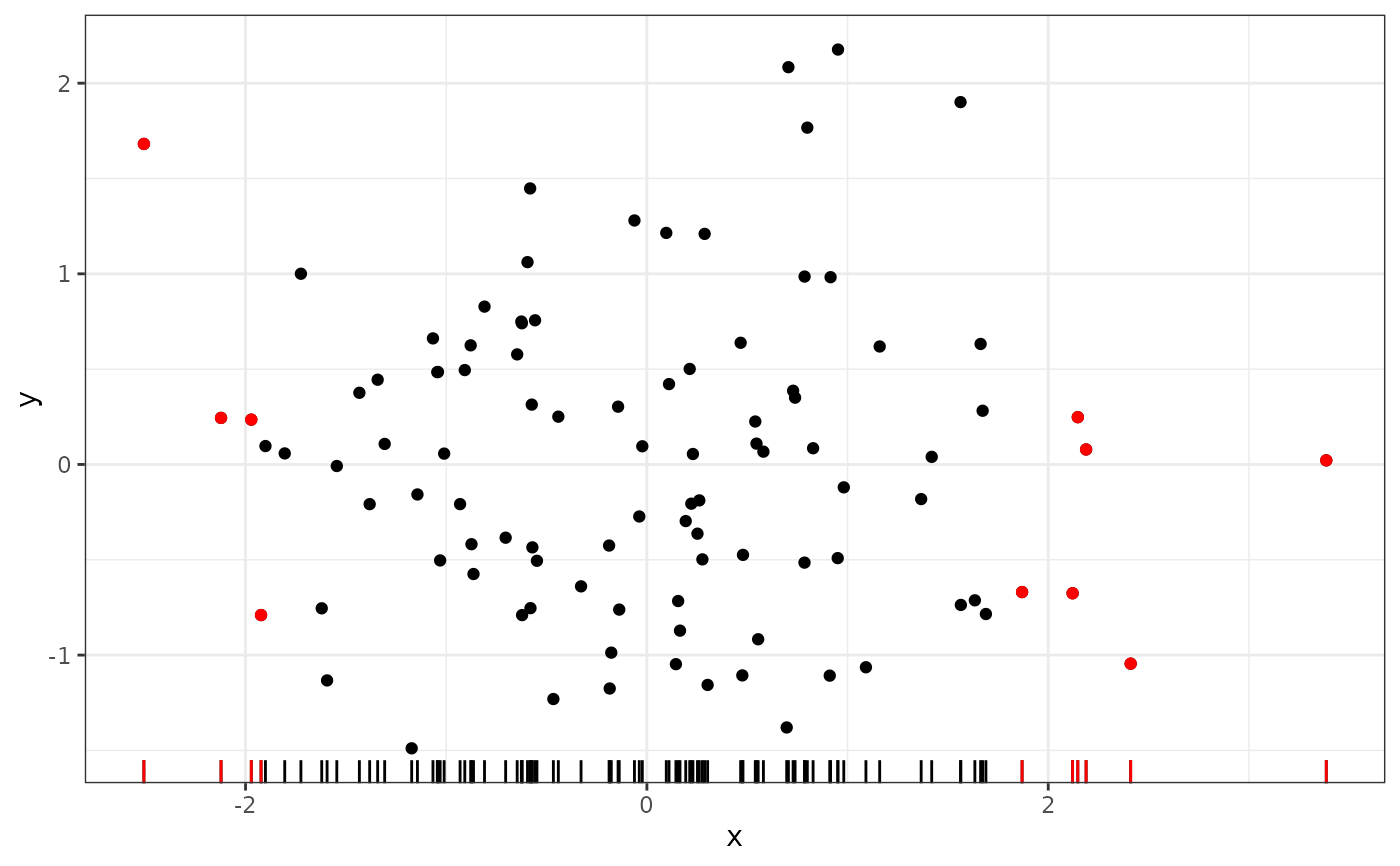
# highlight the 1/10 of observations in sparsest regions of the plot
ggplot(data = d, aes(x, y)) +
geom_point() +
geom_rug(sides = "b") +
stat_dens1d_filter(colour = "red") +
stat_dens1d_filter(geom = "rug", colour = "red", sides = "b")
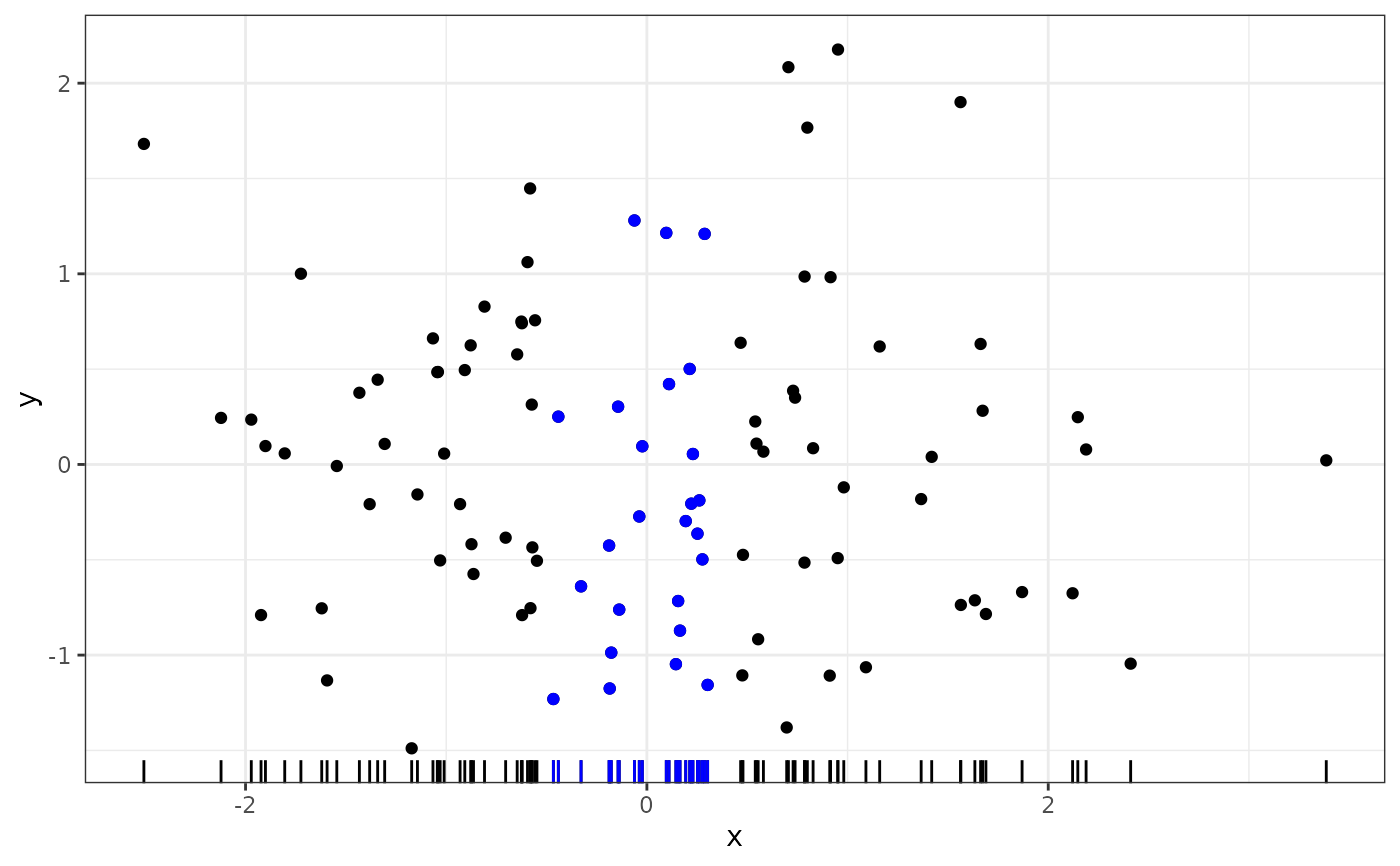
 # highlight the 1/4 of observations in densest regions of the plot
ggplot(data = d, aes(x, y)) +
geom_point() +
geom_rug(sides = "b") +
stat_dens1d_filter(colour = "blue",
keep.fraction = 1/4, keep.sparse = FALSE) +
stat_dens1d_filter(geom = "rug", colour = "blue",
keep.fraction = 1/4, keep.sparse = FALSE,
sides = "b")
# highlight the 1/4 of observations in densest regions of the plot
ggplot(data = d, aes(x, y)) +
geom_point() +
geom_rug(sides = "b") +
stat_dens1d_filter(colour = "blue",
keep.fraction = 1/4, keep.sparse = FALSE) +
stat_dens1d_filter(geom = "rug", colour = "blue",
keep.fraction = 1/4, keep.sparse = FALSE,
sides = "b")
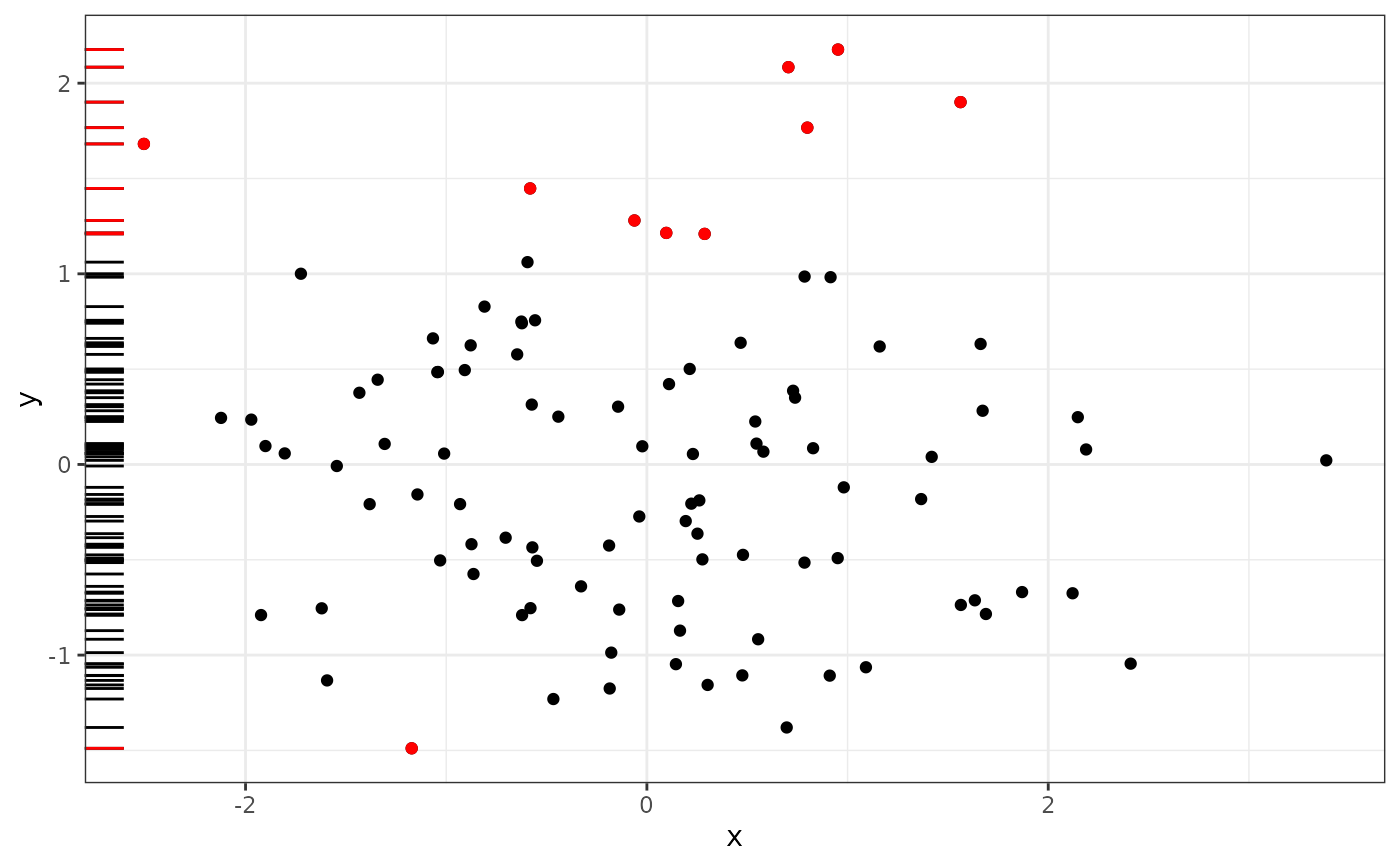
 # switching axes
ggplot(data = d, aes(x, y)) +
geom_point() +
geom_rug(sides = "l") +
stat_dens1d_filter(colour = "red", orientation = "y") +
stat_dens1d_filter(geom = "rug", colour = "red", orientation = "y",
sides = "l")
# switching axes
ggplot(data = d, aes(x, y)) +
geom_point() +
geom_rug(sides = "l") +
stat_dens1d_filter(colour = "red", orientation = "y") +
stat_dens1d_filter(geom = "rug", colour = "red", orientation = "y",
sides = "l")
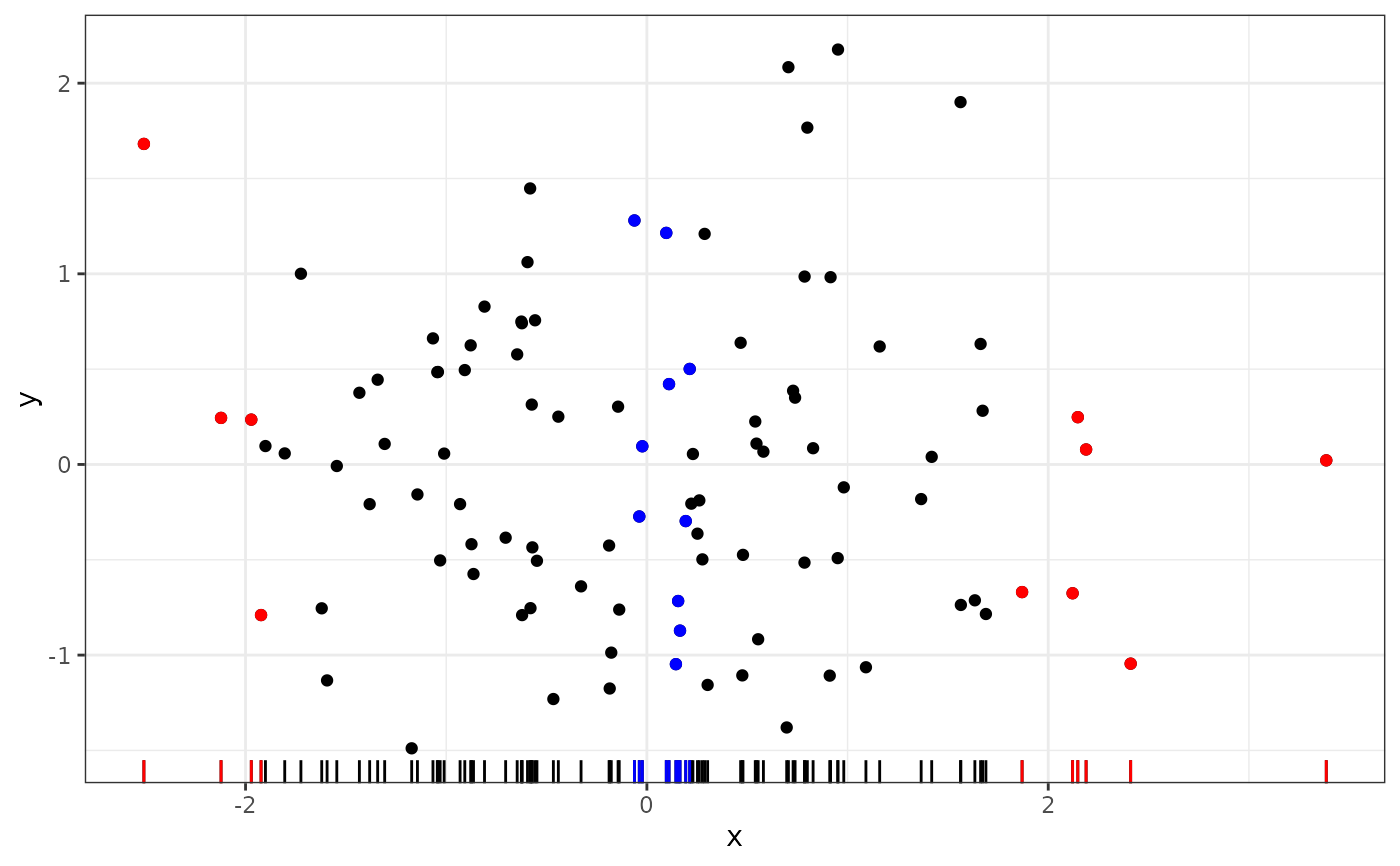
 # highlight 1/10 plus 1/10 observations in high and low density regions
ggplot(data = d, aes(x, y)) +
geom_point() +
geom_rug(sides = "b") +
stat_dens1d_filter(colour = "red") +
stat_dens1d_filter(geom = "rug", colour = "red", sides = "b") +
stat_dens1d_filter(colour = "blue", keep.sparse = FALSE) +
stat_dens1d_filter(geom = "rug",
colour = "blue", keep.sparse = FALSE, sides = "b")
# highlight 1/10 plus 1/10 observations in high and low density regions
ggplot(data = d, aes(x, y)) +
geom_point() +
geom_rug(sides = "b") +
stat_dens1d_filter(colour = "red") +
stat_dens1d_filter(geom = "rug", colour = "red", sides = "b") +
stat_dens1d_filter(colour = "blue", keep.sparse = FALSE) +
stat_dens1d_filter(geom = "rug",
colour = "blue", keep.sparse = FALSE, sides = "b")
 # selecting the 1/10 observations in sparsest regions and their complement
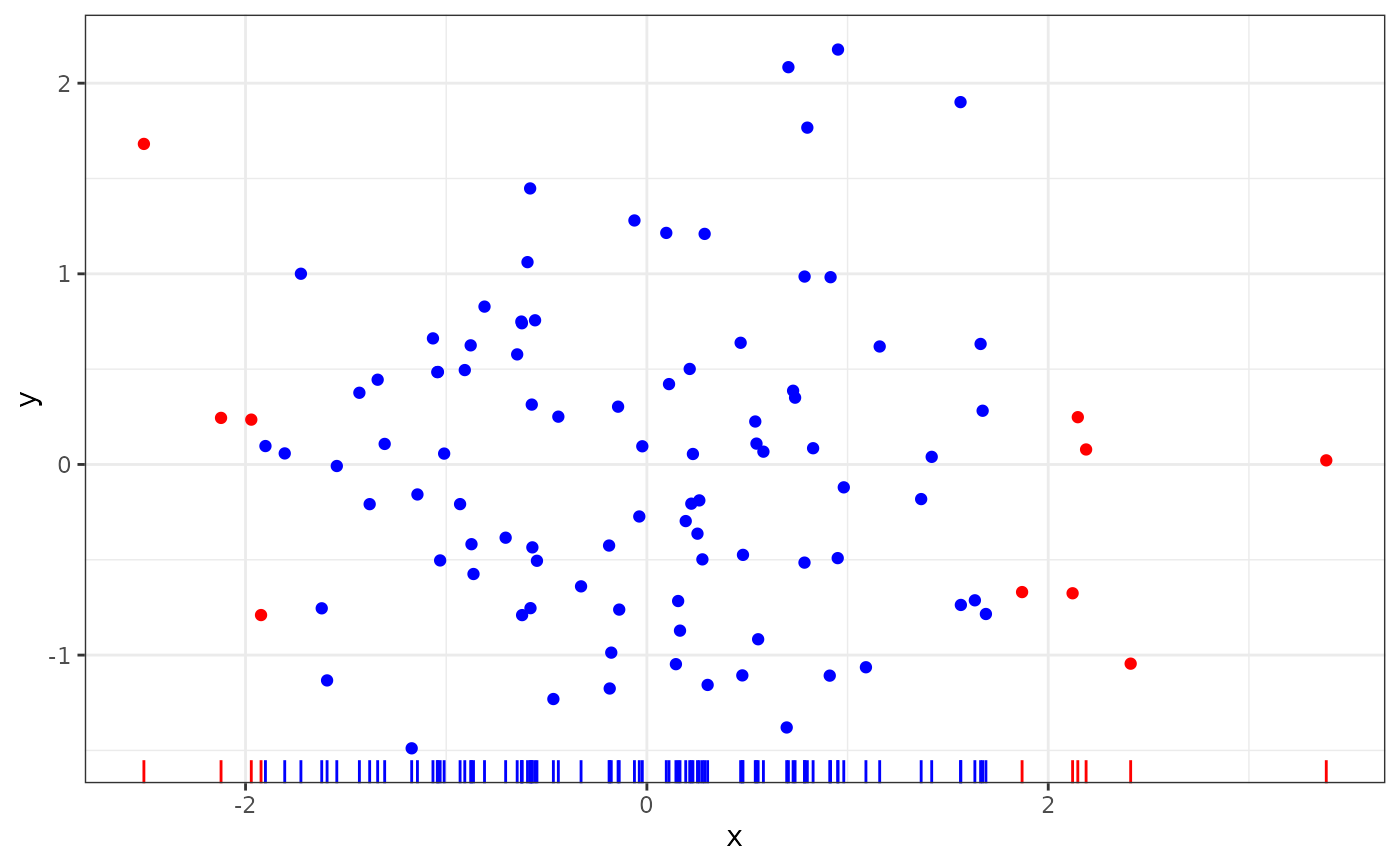
ggplot(data = d, aes(x, y)) +
stat_dens1d_filter(colour = "red") +
stat_dens1d_filter(geom = "rug", colour = "red", sides = "b") +
stat_dens1d_filter(colour = "blue", invert.selection = TRUE) +
stat_dens1d_filter(geom = "rug",
colour = "blue", invert.selection = TRUE, sides = "b")
# selecting the 1/10 observations in sparsest regions and their complement
ggplot(data = d, aes(x, y)) +
stat_dens1d_filter(colour = "red") +
stat_dens1d_filter(geom = "rug", colour = "red", sides = "b") +
stat_dens1d_filter(colour = "blue", invert.selection = TRUE) +
stat_dens1d_filter(geom = "rug",
colour = "blue", invert.selection = TRUE, sides = "b")
 # density filtering done jointly across groups
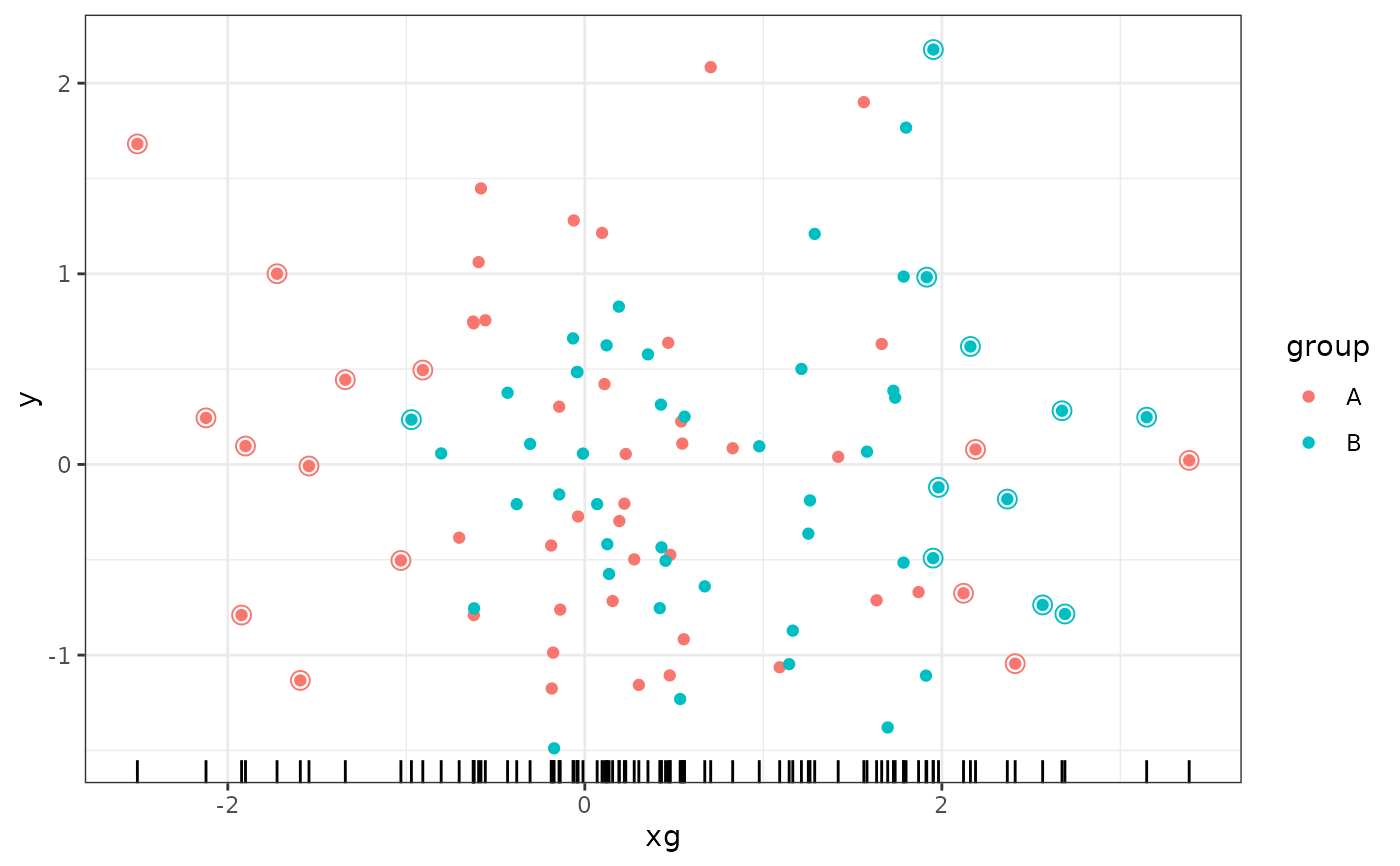
ggplot(data = d, aes(xg, y, colour = group)) +
geom_point() +
geom_rug(sides = "b", colour = "black") +
stat_dens1d_filter(shape = 1, size = 3, keep.fraction = 1/4, adjust = 2)
# density filtering done jointly across groups
ggplot(data = d, aes(xg, y, colour = group)) +
geom_point() +
geom_rug(sides = "b", colour = "black") +
stat_dens1d_filter(shape = 1, size = 3, keep.fraction = 1/4, adjust = 2)
 # density filtering done independently for each group
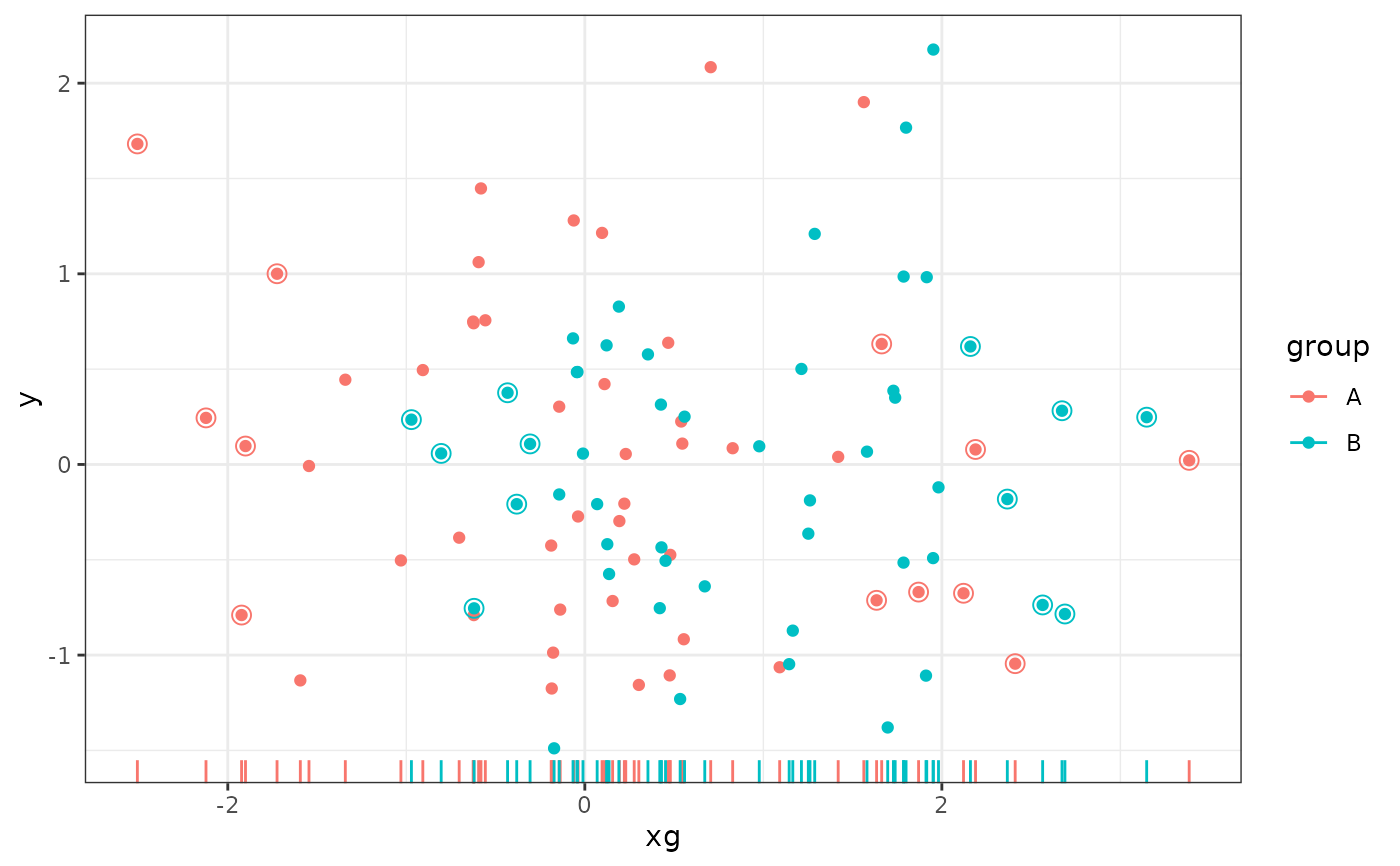
ggplot(data = d, aes(xg, y, colour = group)) +
geom_point() +
geom_rug(sides = "b") +
stat_dens1d_filter_g(shape = 1, size = 3, keep.fraction = 1/4, adjust = 2)
# density filtering done independently for each group
ggplot(data = d, aes(xg, y, colour = group)) +
geom_point() +
geom_rug(sides = "b") +
stat_dens1d_filter_g(shape = 1, size = 3, keep.fraction = 1/4, adjust = 2)
 # density filtering done jointly across groups by overriding grouping
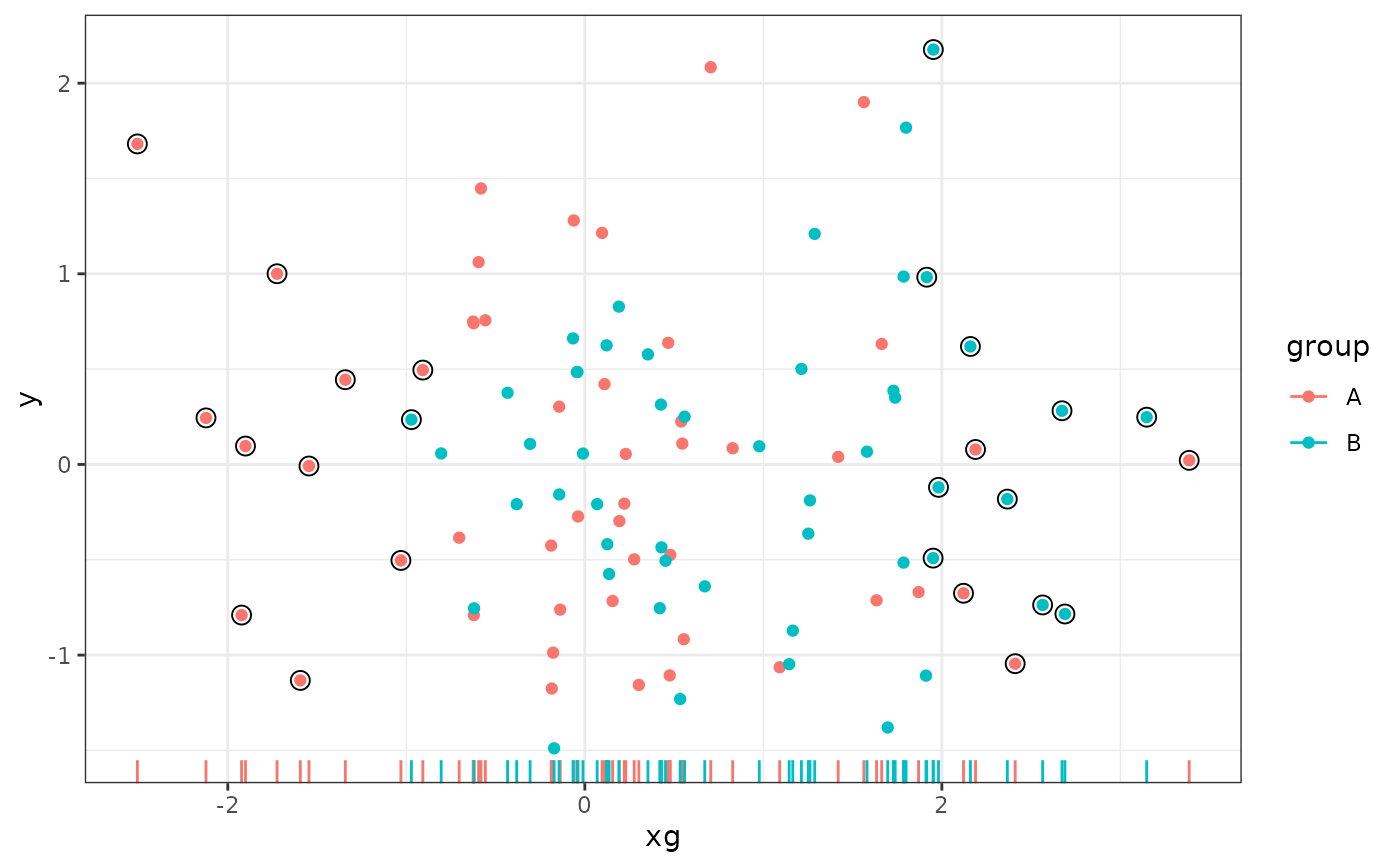
ggplot(data = d, aes(xg, y, colour = group)) +
geom_point() +
geom_rug(sides = "b") +
stat_dens1d_filter_g(colour = "black",
shape = 1, size = 3, keep.fraction = 1/4, adjust = 2)
# density filtering done jointly across groups by overriding grouping
ggplot(data = d, aes(xg, y, colour = group)) +
geom_point() +
geom_rug(sides = "b") +
stat_dens1d_filter_g(colour = "black",
shape = 1, size = 3, keep.fraction = 1/4, adjust = 2)
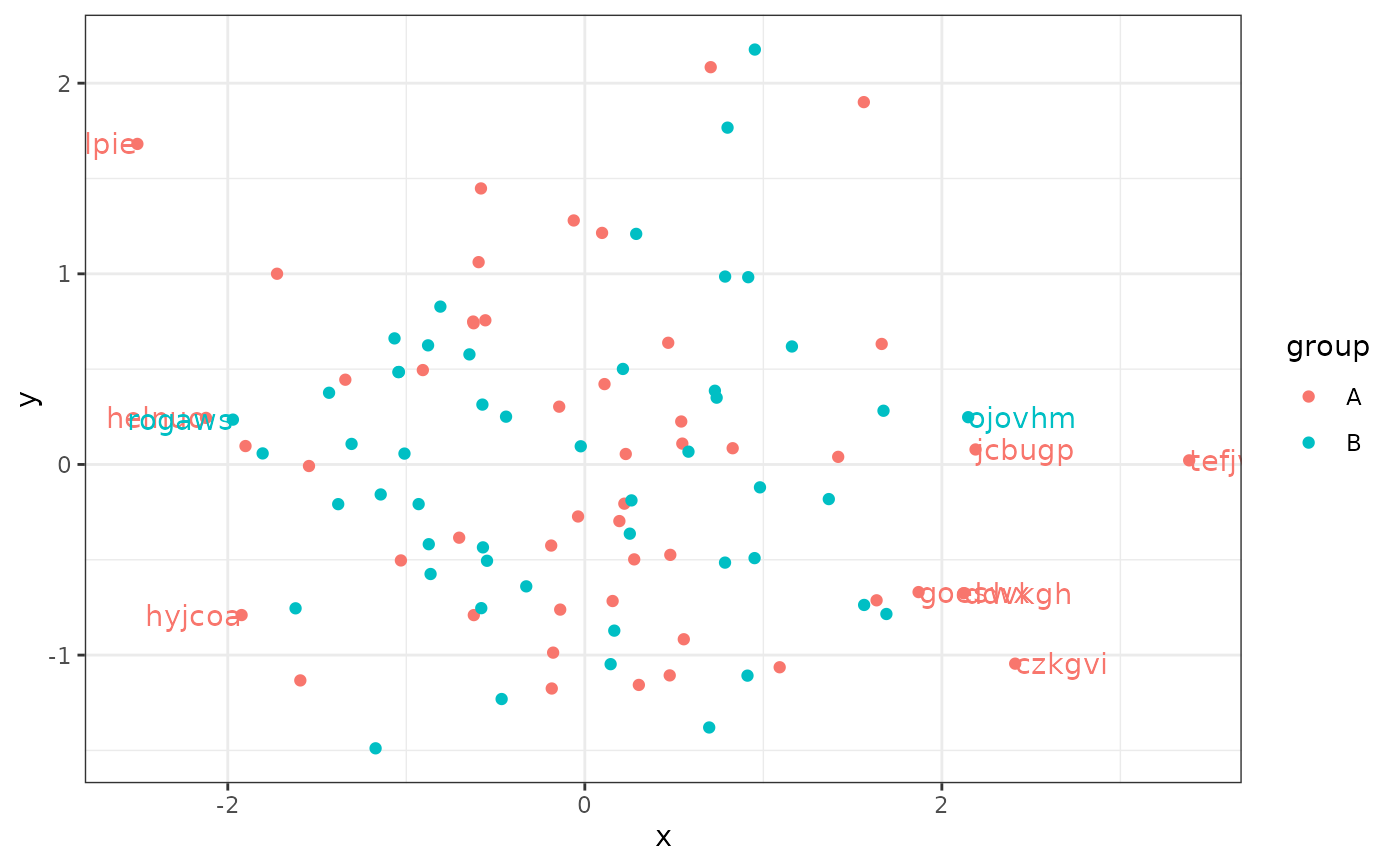
 # label observations
ggplot(data = d, aes(x, y, label = lab, colour = group)) +
geom_point() +
stat_dens1d_filter(geom = "text", hjust = "outward")
# label observations
ggplot(data = d, aes(x, y, label = lab, colour = group)) +
geom_point() +
stat_dens1d_filter(geom = "text", hjust = "outward")
 # looking under the hood with gginnards::geom_debug()
gginnards.installed <- requireNamespace("gginnards", quietly = TRUE)
if (gginnards.installed) {
library(gginnards)
ggplot(data = d, aes(x, y, label = lab, colour = group)) +
stat_dens1d_filter(geom = "debug")
ggplot(data = d, aes(x, y, label = lab, colour = group)) +
stat_dens1d_filter(geom = "debug", return.density = TRUE)
}
# looking under the hood with gginnards::geom_debug()
gginnards.installed <- requireNamespace("gginnards", quietly = TRUE)
if (gginnards.installed) {
library(gginnards)
ggplot(data = d, aes(x, y, label = lab, colour = group)) +
stat_dens1d_filter(geom = "debug")
ggplot(data = d, aes(x, y, label = lab, colour = group)) +
stat_dens1d_filter(geom = "debug", return.density = TRUE)
}
 #> [1] "PANEL 1; group(s) 1, 2; 'draw_function()' input 'data' (head):"
#> colour x y label PANEL group keep.obs density
#> 1 #F8766D 2.188648 0.07862339 jcbugp 1 1 TRUE 0.07379578
#> 2 #F8766D -2.506536 1.68140888 uhlpie 1 1 TRUE 0.04193917
#> 3 #F8766D 1.869629 -0.66947367 goeswx 1 1 TRUE 0.10607707
#> 4 #F8766D 2.410739 -1.04494146 czkgvi 1 1 TRUE 0.05366756
#> 5 #F8766D -1.922795 -0.79001074 hyjcoa 1 1 TRUE 0.10997036
#> 6 #F8766D 2.121359 -0.67567231 ddvkgh 1 1 TRUE 0.08033939
#> xintercept orientation
#> 1 0 x
#> 2 0 x
#> 3 0 x
#> 4 0 x
#> 5 0 x
#> 6 0 x
#> [1] "PANEL 1; group(s) 1, 2; 'draw_function()' input 'data' (head):"
#> colour x y label PANEL group keep.obs density
#> 1 #F8766D 2.188648 0.07862339 jcbugp 1 1 TRUE 0.07379578
#> 2 #F8766D -2.506536 1.68140888 uhlpie 1 1 TRUE 0.04193917
#> 3 #F8766D 1.869629 -0.66947367 goeswx 1 1 TRUE 0.10607707
#> 4 #F8766D 2.410739 -1.04494146 czkgvi 1 1 TRUE 0.05366756
#> 5 #F8766D -1.922795 -0.79001074 hyjcoa 1 1 TRUE 0.10997036
#> 6 #F8766D 2.121359 -0.67567231 ddvkgh 1 1 TRUE 0.08033939
#> xintercept orientation
#> 1 0 x
#> 2 0 x
#> 3 0 x
#> 4 0 x
#> 5 0 x
#> 6 0 x