For all examples the movies data set contained in the package will be used.
library(UpSetR)
movies <- read.csv( system.file("extdata", "movies.csv", package = "UpSetR"), header=T, sep=";" )
queries Parameter Breakdown
Each list contained in the queries parameter takes 4
fields: query, params, color, and
active.
queryspecifies which query is going to be runparamsis a list of paramters for the query to work oncoloris the color that will represent the query on the plot. If no color is provided, a color will be selected from the UpSetR default color palette.activedetermines how the query will be represented on the plot. IfactiveisTRUE, the intersection size bar will be overlayed by a bar representing the query. IfactiveisFALSE, a jitter point will be placed on the intersection size bar.
To learn how queries can be explored and visualized on an element level see the Attribute Plots vignette.
Example 1: Built-in Intersection Query
This example shows how to use the built in intersection query,
intersects, to find or display elements in specific
intersections. In this example the color selected for the active query
is from the default color palette.
upset(movies, queries = list(list(query = intersects, params = list("Drama", "Comedy", "Action"), color = "orange", active = T), list(query = intersects, params = list("Drama"), color = "red", active = F), list(query = intersects, params = list("Action", "Drama"), active = T)))## Warning: `aes_string()` was deprecated in ggplot2 3.0.0.
## ℹ Please use tidy evaluation idioms with `aes()`.
## ℹ See also `vignette("ggplot2-in-packages")` for more information.
## ℹ The deprecated feature was likely used in the UpSetR package.
## Please report the issue to the authors.
## This warning is displayed once every 8 hours.
## Call `lifecycle::last_lifecycle_warnings()` to see where this warning was
## generated.## Warning: Using `size` aesthetic for lines was deprecated in ggplot2 3.4.0.
## ℹ Please use `linewidth` instead.
## ℹ The deprecated feature was likely used in the UpSetR package.
## Please report the issue to the authors.
## This warning is displayed once every 8 hours.
## Call `lifecycle::last_lifecycle_warnings()` to see where this warning was
## generated.## Warning: The `size` argument of `element_line()` is deprecated as of ggplot2 3.4.0.
## ℹ Please use the `linewidth` argument instead.
## ℹ The deprecated feature was likely used in the UpSetR package.
## Please report the issue to the authors.
## This warning is displayed once every 8 hours.
## Call `lifecycle::last_lifecycle_warnings()` to see where this warning was
## generated.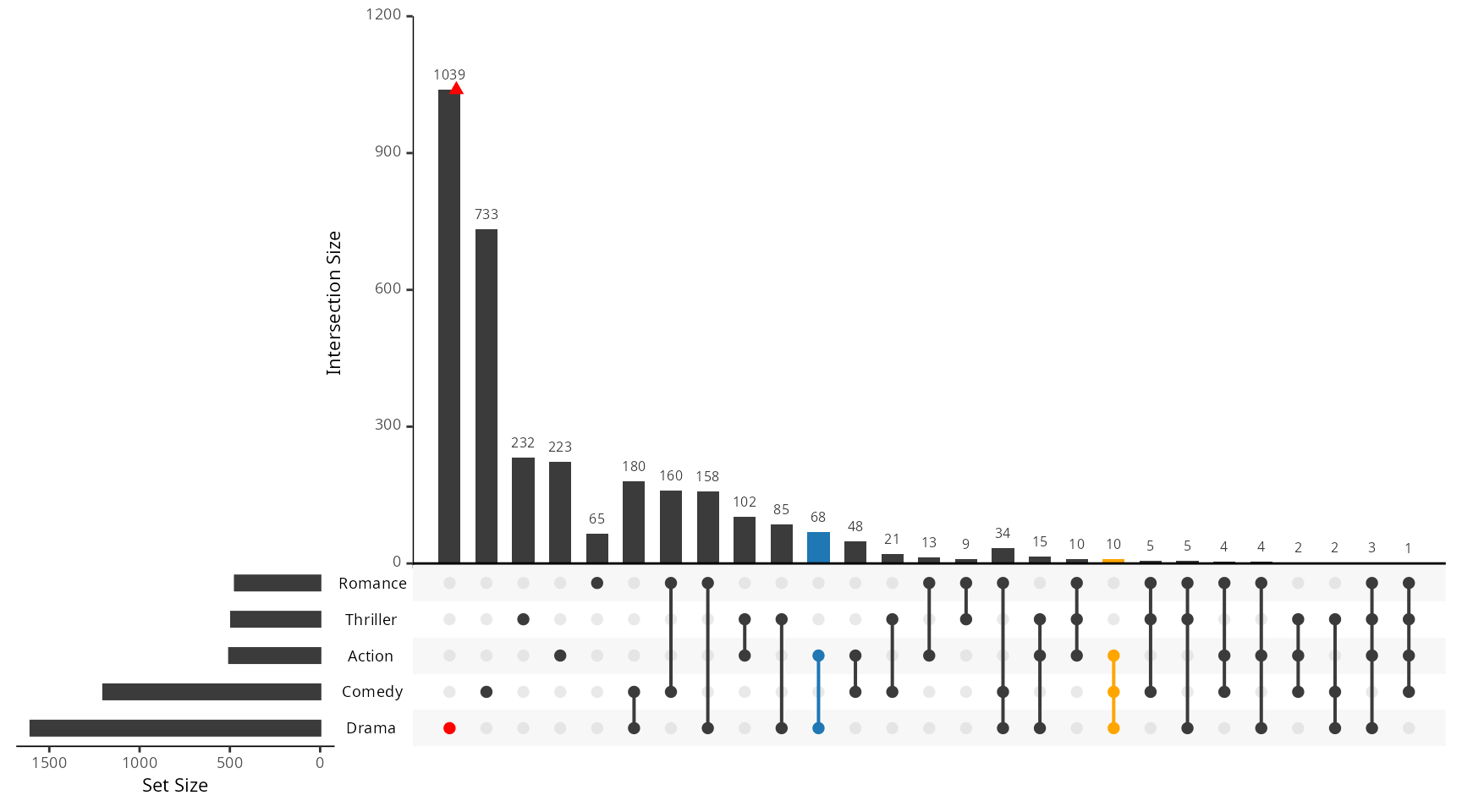
Example 2: Built-In Elements Query
This example shows how to use the built in element query,
elements, to visualize how certain elements are distributed
amongst the intersections.
upset(movies, queries = list(list(query = elements, params = list("AvgRating", 3.5, 4.1), color = "blue", active = T), list(query = elements, params = list("ReleaseDate", 1980, 1990, 2000), color = "red", active = F)))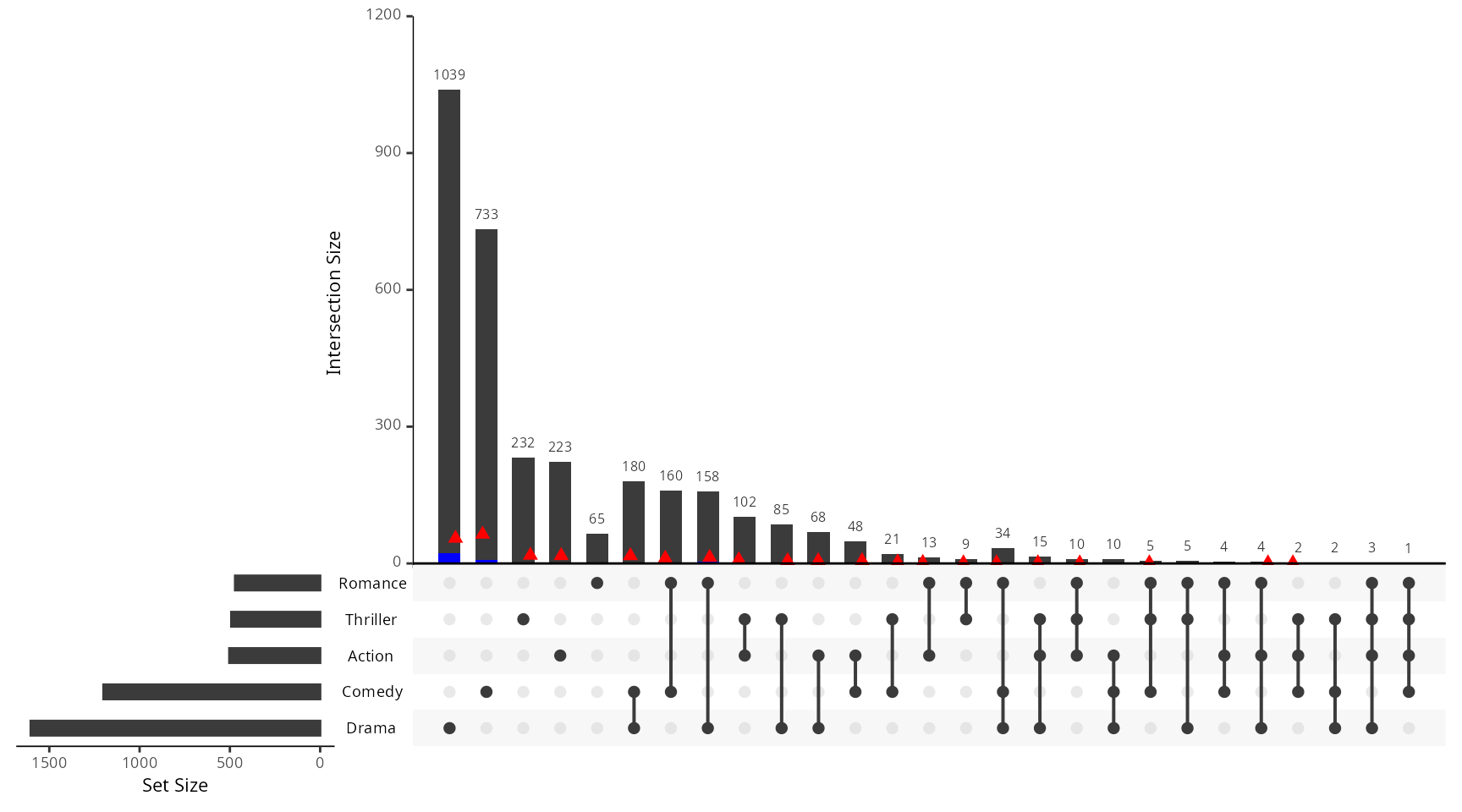
Example 3: Using Expression Parameter to Subset Intersection and Element Queries
This example shows how to use the expression parameter
to subset the results of element and intersection queries.
upset(movies, queries = list(list(query = intersects, params = list("Action", "Drama"), active = T), list(query = elements, params = list("ReleaseDate", 1980, 1990, 2000), color = "red", active = F)), expression = "AvgRating > 3 & Watches > 100")## Warning in geom_bar(data = bElemDat, aes_string(x = "x", y = "freq"), fill =
## bElemDat$color, : Ignoring empty aesthetic: `fill`.## Warning in geom_point(data = pInterDat, aes_string(x = "x", y = "freq"), :
## Ignoring empty aesthetic: `colour`.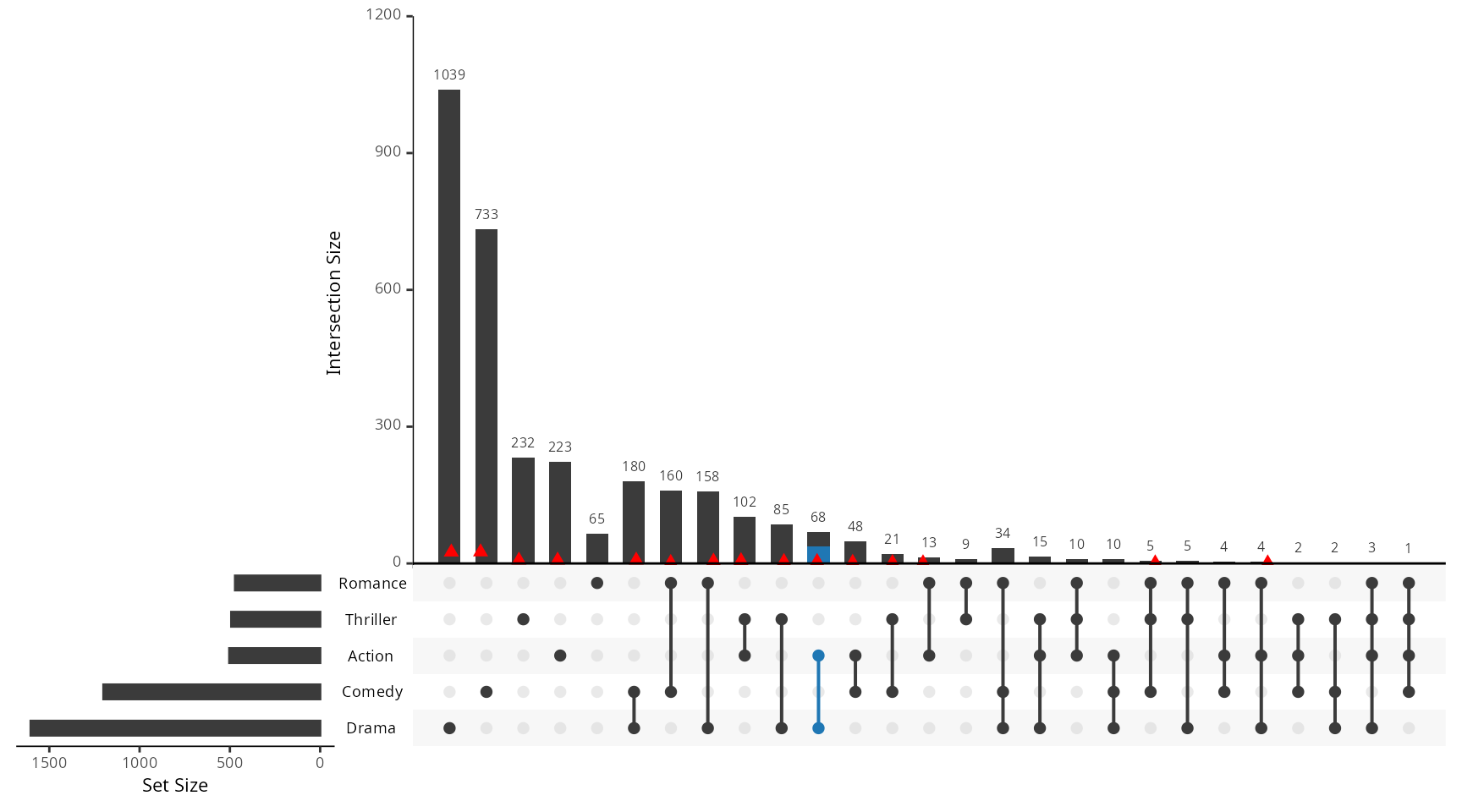
Example 4: Creating Custom Queries on Set Elements and Attributes
Creating a custom query to operate on the rows of the data.
Myfunc <- function(row, release, rating){
    data <- (row["ReleaseDate"] %in% release) & (row["AvgRating"] > rating)
}
Applying the created query to the queries parameter.
upset(movies, queries = list(list(query = Myfunc, params = list(c(1970,1980, 1990, 1999, 2000), 2.5), color = "blue", active =T)))## Warning in geom_point(data = pCustomDat, aes_string(x = "x", y = "freq2"), :
## Ignoring empty aesthetic: `colour`.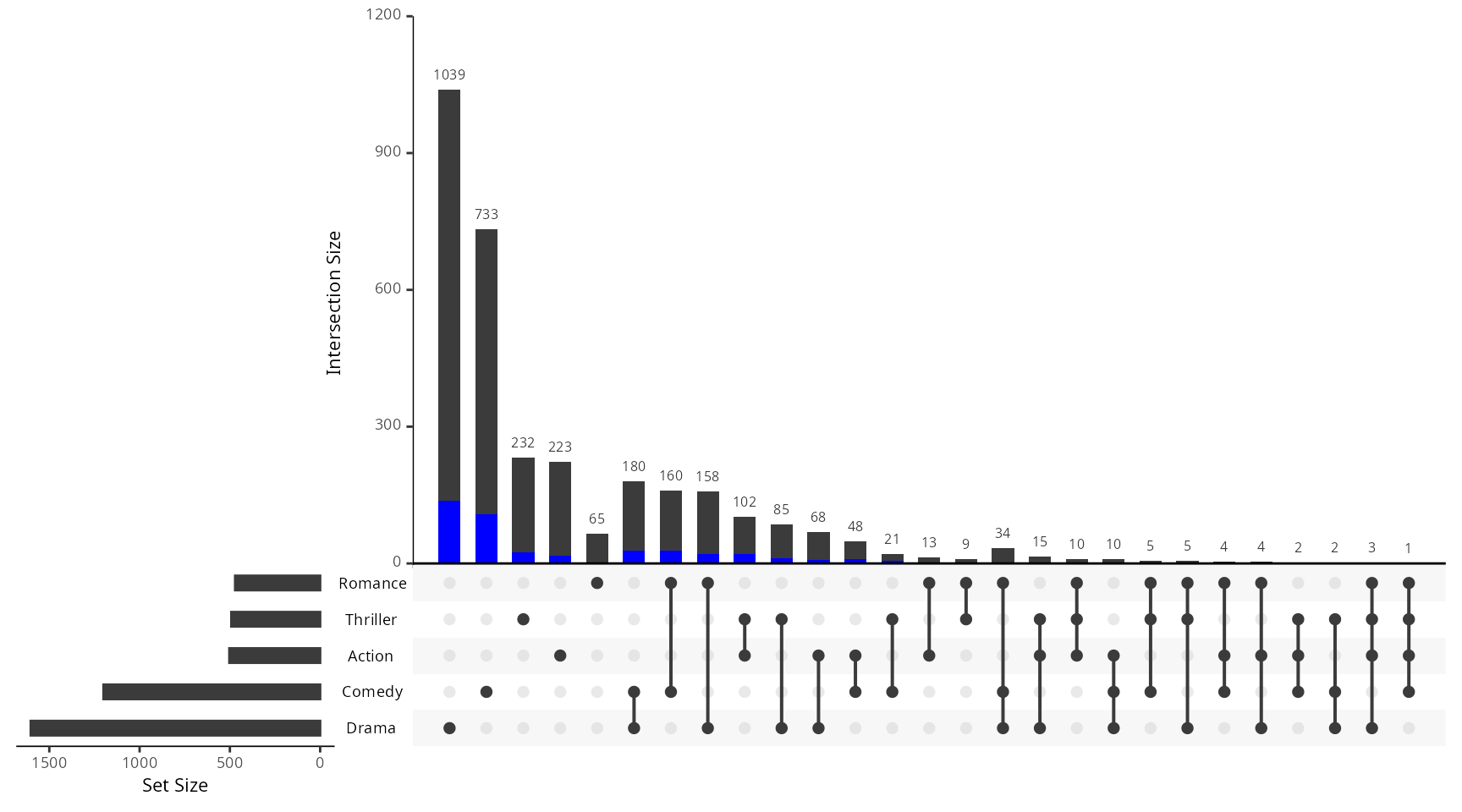
Example 5: Applying a query legend
To add a legend for the queries applied, the
query.legend parameter can be used. The
query.legend parameter takes the position where the legend
should be displayed, either top or bottom. To apply a
specific name to each query, the parameter query.name can
be used when defining the query in the queries paramter. If
no query.name is provided, a generic name will be used. The
example below shows how to do this.
upset(movies, query.legend = "top", queries = list(list(query = intersects, params = list("Drama", "Comedy", "Action"), color = "orange", active = T, query.name="Funny action"), list(query = intersects, params = list("Drama"), color = "red", active = F), list(query = intersects, params = list("Action", "Drama"), active = T, query.name="Emotional action")))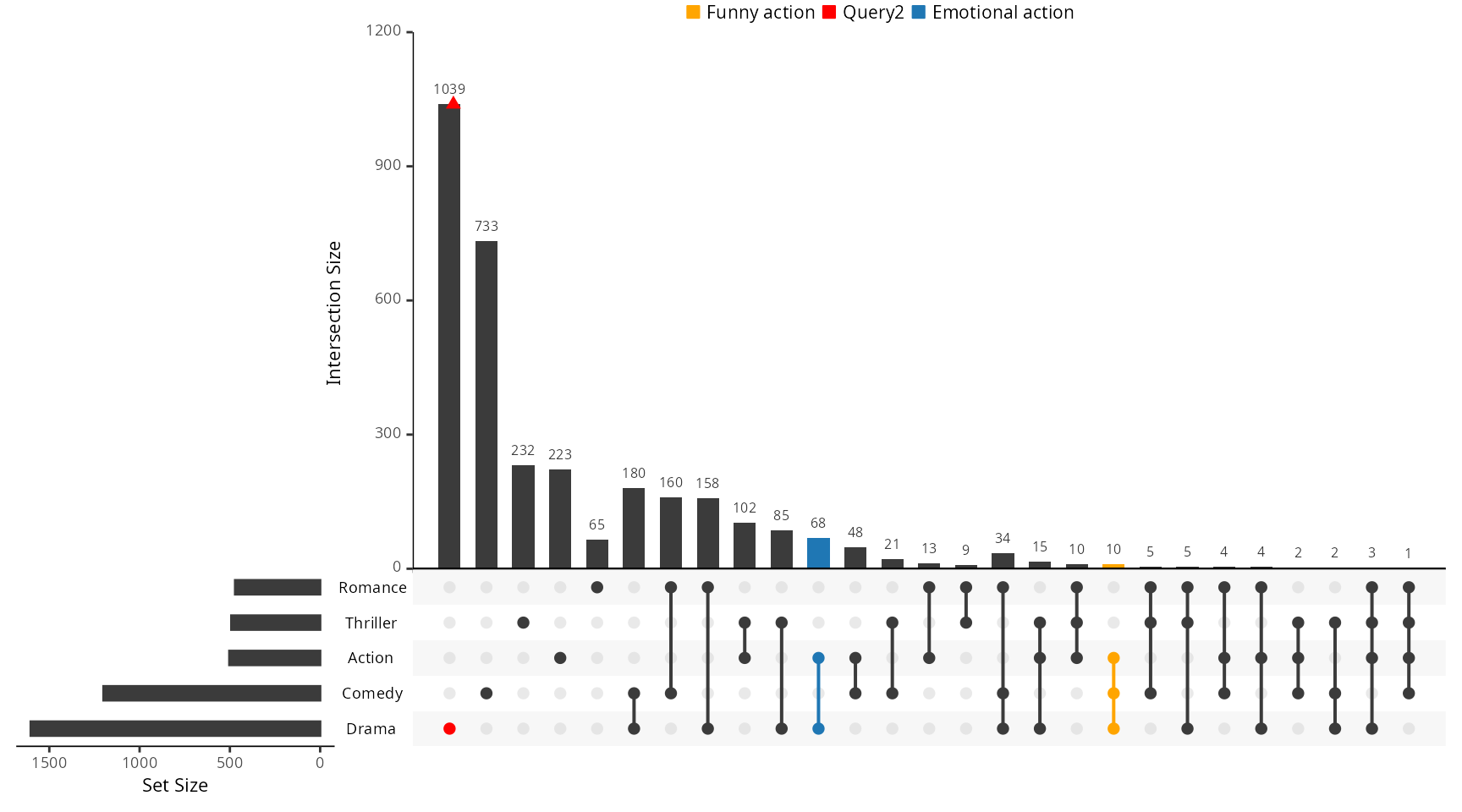
Example 6: Applying Everything at Once
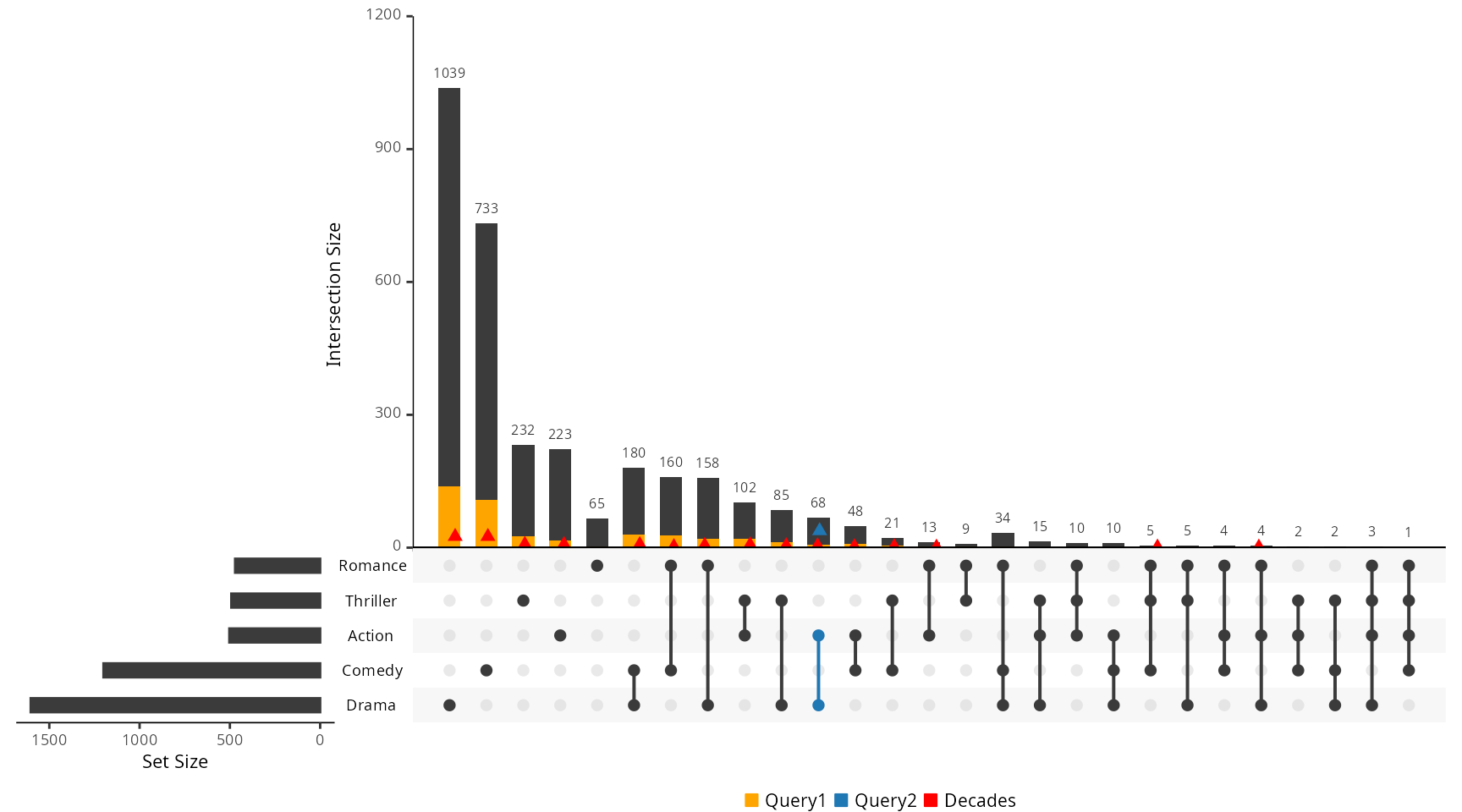
Combining pieces from all previous examples into one awesome query!
upset(movies, query.legend = "bottom", queries = list(list(query = Myfunc, params = list(c(1970,1980, 1990, 1999, 2000), 2.5), color = "orange", active =T), list(query = intersects, params = list("Action", "Drama"), active = F), list(query = elements, params = list("ReleaseDate", 1980, 1990, 2000), color = "red", active = F, query.name="Decades")), expression = "AvgRating > 3 & Watches > 100")## Warning in geom_bar(data = bInterDat, aes_string(x = "x", y = "freq"), fill =
## bInterDat$color, : Ignoring empty aesthetic: `fill`.## Warning in geom_bar(data = bElemDat, aes_string(x = "x", y = "freq"), fill =
## bElemDat$color, : Ignoring empty aesthetic: `fill`.## Warning in geom_point(data = pCustomDat, aes_string(x = "x", y = "freq2"), :
## Ignoring empty aesthetic: `colour`.