Attribute Plots
Jake Conway and Nils Gehlenborg
Source:vignettes/attribute.plots.Rmd
attribute.plots.RmdFor all examples the movies data set contained in the package will be used.
library(UpSetR); library(ggplot2); library(grid); library(plyr)
movies <- read.csv( system.file("extdata", "movies.csv", package = "UpSetR"), header=T, sep=";" )
attribute.plots Parameter Breakdown
The attribute.plots parameter is broken down into 3
fields: gridrows, plots, and
ncols
gridrows: specifies how much to expand the plot window to add room for attribute plots. The UpSetR plot is plotted on a 100 by 100 grid. So for example, if we setgridrowsto 50, the new grid layout would be 150 by 100, setting aside 1/3 of the plot for the attribute plots.plots: takes a list of paramters. These paramters includeplot,x,y(if applicable), andqueries.plot: is a function that returns a ggplotx: is the x aesthetic to be used in the ggplot (entered as string)y: is the y aesthetic to be used in the ggplot (entered as string)queries: indicates whether or not to overlay the plot with the queries present. IfqueriesisTRUE, the attribute plot will be overlayed with data from the queries. IfqueriesisFALSE, no query results will be plotted on the attribute plot.ncols: specifies how the plots should be arranged in thegridrowsspace. If two attribute plots are entered andncolsis 1,then the plots will display one above the other. Alternatively, if two attribute plots are entered andncolsis 2, the attribute plots will be displayed side by side.
Additional: to add a legend of the queries, use
query.legend = "bottom" (see Example 2).
Example 1: Built-In Attribute Histogram
Example of how to add built-in histogram attribute plot. If
main.bar.color is not specified as black, elements
contained in black intersection size bars will be represented as gray in
attribute plots.
upset(movies, main.bar.color = "black", queries = list(list(query = intersects, params = list("Drama"), active = T)), attribute.plots = list(gridrows = 50, plots = list(list(plot = histogram, x = "ReleaseDate", queries = F), list(plot = histogram, x = "AvgRating", queries = T)), ncols = 2))## Warning: `aes_string()` was deprecated in ggplot2 3.0.0.
## ℹ Please use tidy evaluation idioms with `aes()`.
## ℹ See also `vignette("ggplot2-in-packages")` for more information.
## ℹ The deprecated feature was likely used in the UpSetR package.
## Please report the issue to the authors.
## This warning is displayed once every 8 hours.
## Call `lifecycle::last_lifecycle_warnings()` to see where this warning was
## generated.## Warning in geom_point(data = pInterDat, aes_string(x = "x", y = "freq"), :
## Ignoring empty aesthetic: `colour`.## Warning: Using `size` aesthetic for lines was deprecated in ggplot2 3.4.0.
## ℹ Please use `linewidth` instead.
## ℹ The deprecated feature was likely used in the UpSetR package.
## Please report the issue to the authors.
## This warning is displayed once every 8 hours.
## Call `lifecycle::last_lifecycle_warnings()` to see where this warning was
## generated.## Warning: The `size` argument of `element_line()` is deprecated as of ggplot2 3.4.0.
## ℹ Please use the `linewidth` argument instead.
## ℹ The deprecated feature was likely used in the UpSetR package.
## Please report the issue to the authors.
## This warning is displayed once every 8 hours.
## Call `lifecycle::last_lifecycle_warnings()` to see where this warning was
## generated.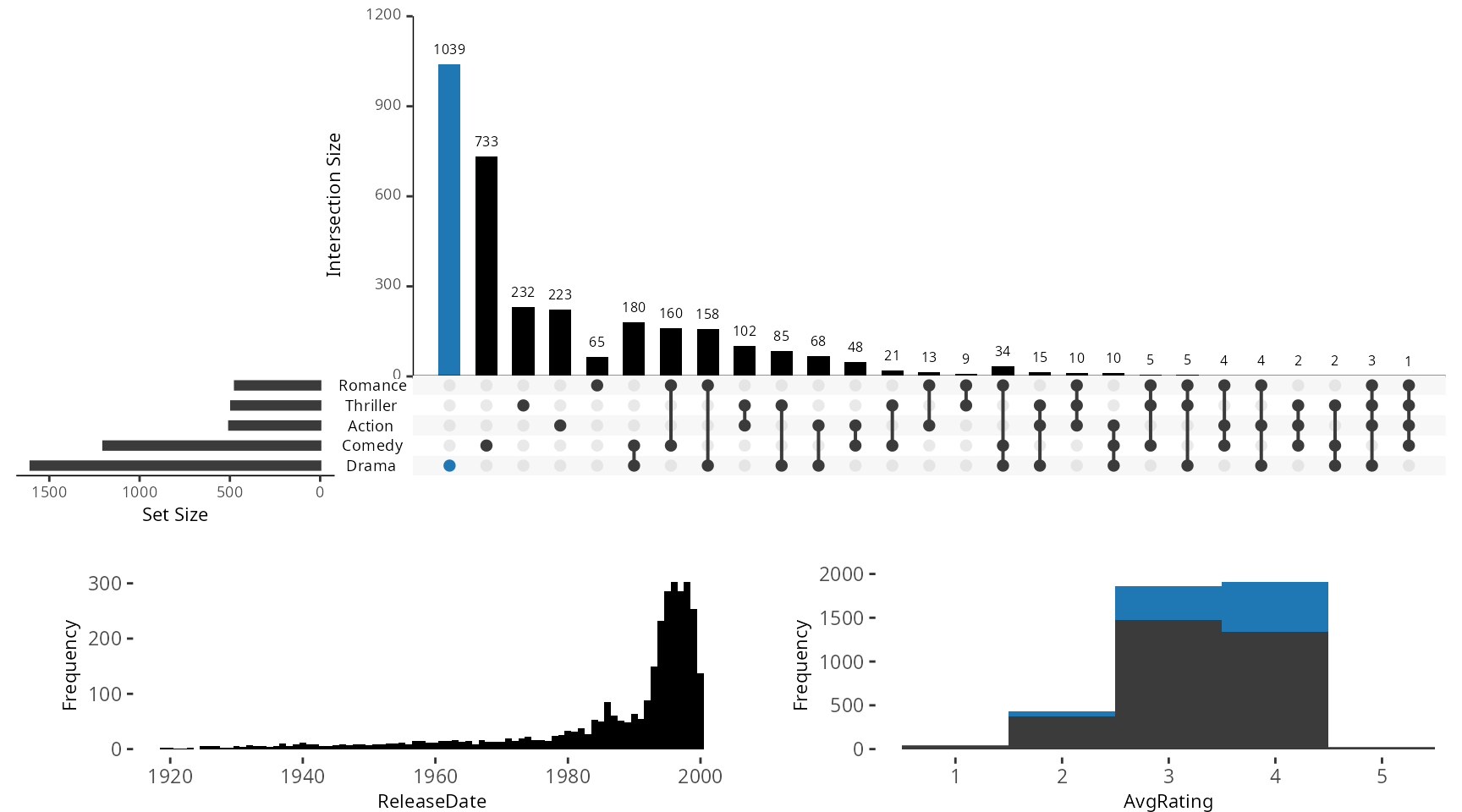
Example 2: Built-In Attribute Scatter Plot
Example of how to add built-in attribute scatter plot. If
main.bar.color not specified as black, elements contained
in black intersection size bars will be represented as gray in attribute
plots.
notice the use of query.legend
upset(movies, main.bar.color = "black", queries = list(list(query = intersects, params = list("Drama"), color = "red", active = F), list(query = intersects, params = list("Action", "Drama"), active = T), list(query = intersects, params = list("Drama", "Comedy", "Action"), color = "orange", active = T)), attribute.plots = list(gridrows = 45, plots = list(list(plot = scatter_plot, x = "ReleaseDate", y = "AvgRating", queries = T), list(plot = scatter_plot, x = "AvgRating", y = "Watches", queries = F)), ncols = 2), query.legend = "bottom")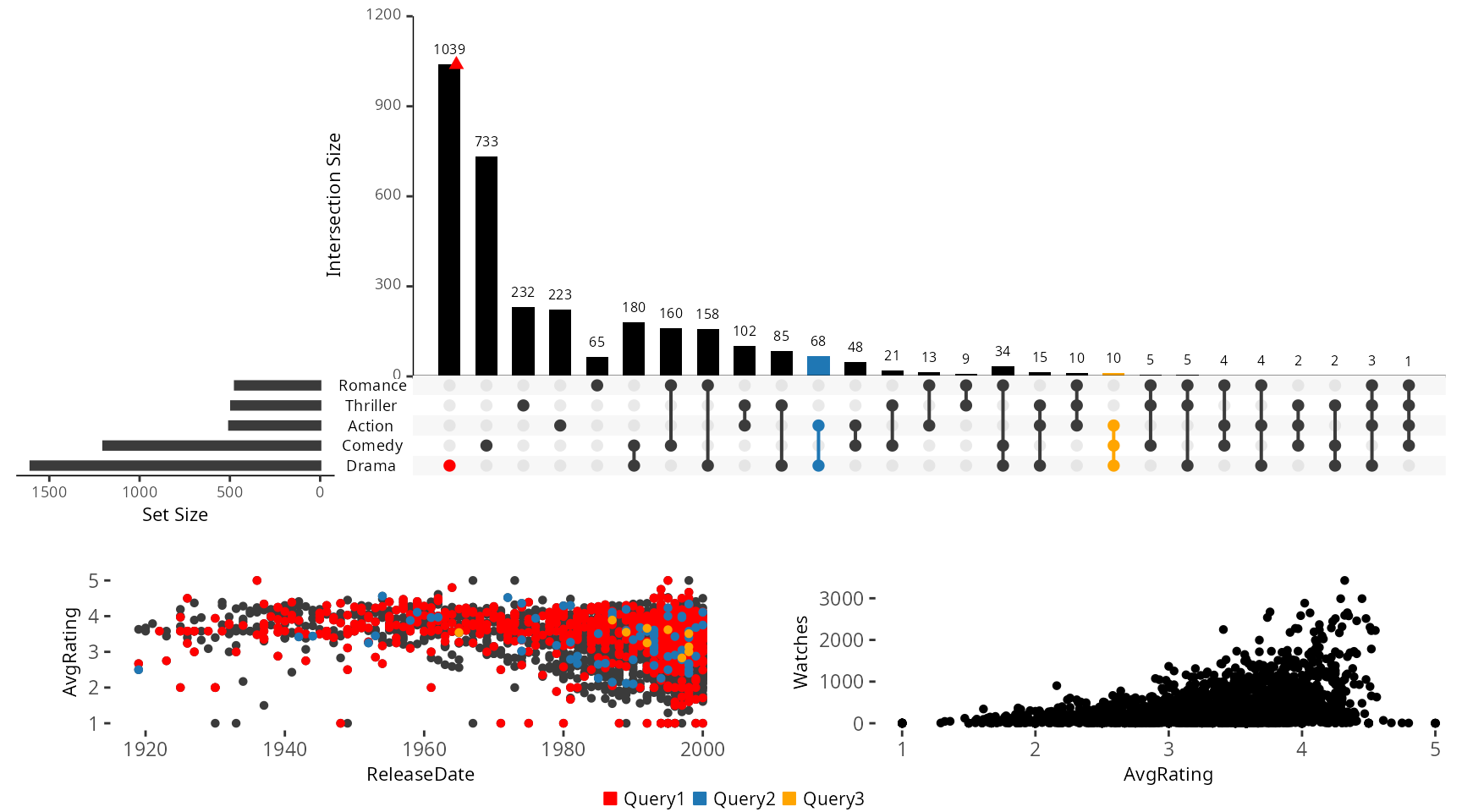
Example 3: Creating a Custom Attribute Plot
Contents of aes_string() along with the
scale_color_identity() function are
required to pass in aesthetics and to make sure the
correct colors are applied. A plot.margin of
c(0.5,0,0,1) is recommended.
myplot <- function(mydata,x,y){
    plot <- (ggplot(data = mydata, aes_string(x=x, y=y, colour = "color")) + geom_point() +    scale_color_identity() + theme(plot.margin = unit(c(0,0,0,0), "cm")))
}

another.plot <- function(data, x, y){
  data$decades <- round_any(as.integer(unlist(data[y])), 10, ceiling)
  data <- data[which(data$decades >= 1970), ]
  myplot <- (ggplot(data, aes_string(x=x)) +
               geom_density(aes(fill=factor(decades)), alpha = 0.4)
             +theme(plot.margin = unit(c(0,0,0,0), "cm"), legend.key.size = unit(0.4,"cm")))
}
Example of applying the myplot custom attribute plot
defined above to the data.
upset(movies, main.bar.color = "black", queries = list(list(query = intersects, params = list("Drama"), color = "red", active = F), list(query = intersects, params = list("Action", "Drama"), active = T), list(query = intersects, params = list("Drama", "Comedy", "Action"), color = "orange", active = T)), attribute.plots = list(gridrows = 45, plots = list(list(plot = myplot, x = "ReleaseDate", y = "AvgRating", queries = T), list(plot = another.plot, x = "AvgRating", y = "ReleaseDate", queries = F)), ncols = 2))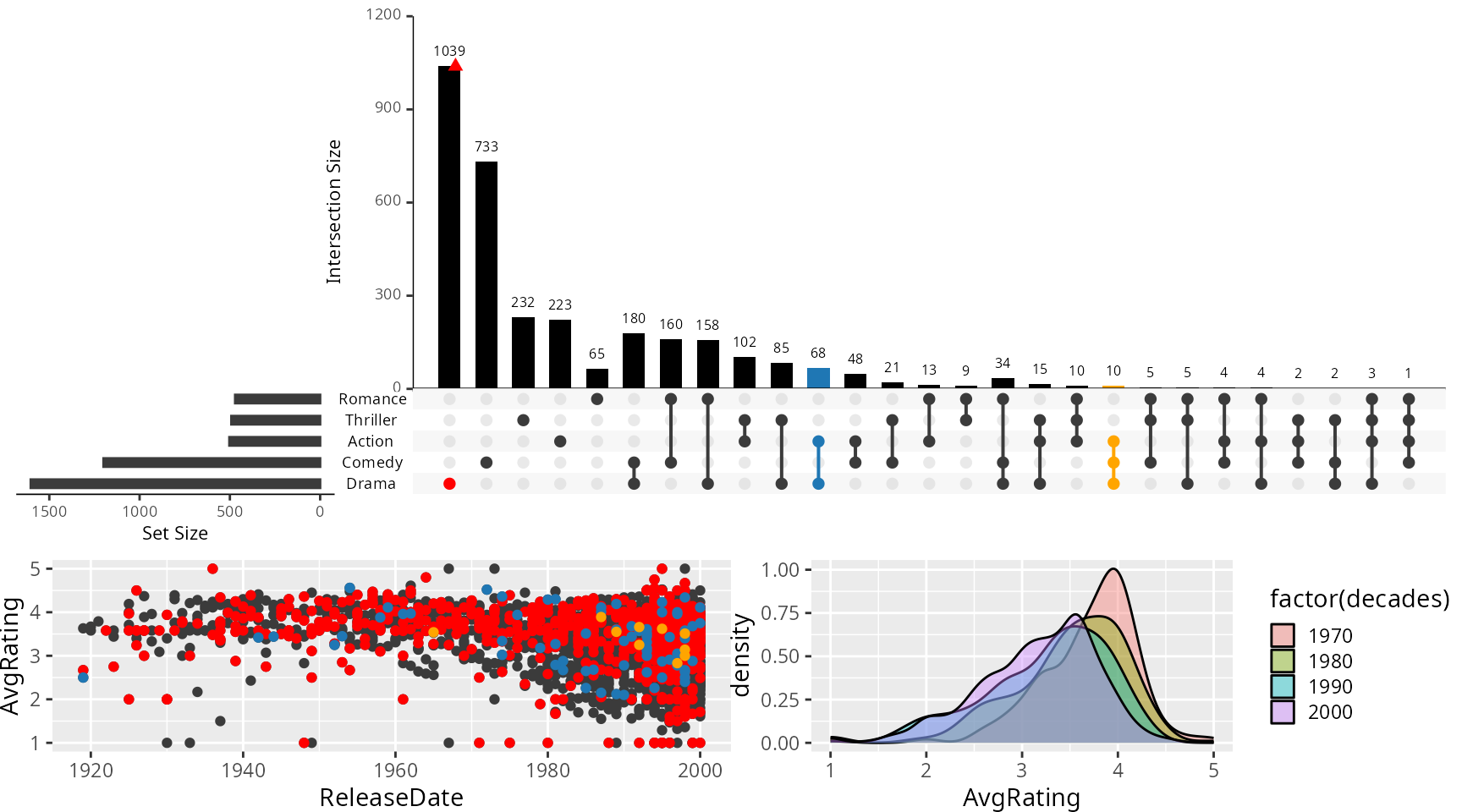
Example 4: Applying Everything at Once
Combining the built-in scatter plot and histogram plot with the
myplot custom plot defined in the example above.
upset(movies, main.bar.color = "black", mb.ratio = c(0.5,0.5), queries = list(list(query = intersects, params = list("Drama"), color = "red", active = F), list(query = intersects, params = list("Action", "Drama"), active = T), list(query = intersects, params = list("Drama", "Comedy", "Action"), color = "orange", active = T)), attribute.plots = list(gridrows=50, plots = list(list(plot = histogram, x = "ReleaseDate", queries = F), list(plot = scatter_plot, x = "ReleaseDate", y = "AvgRating", queries = T),list(plot = myplot, x = "AvgRating", y = "Watches", queries = F)), ncols = 3))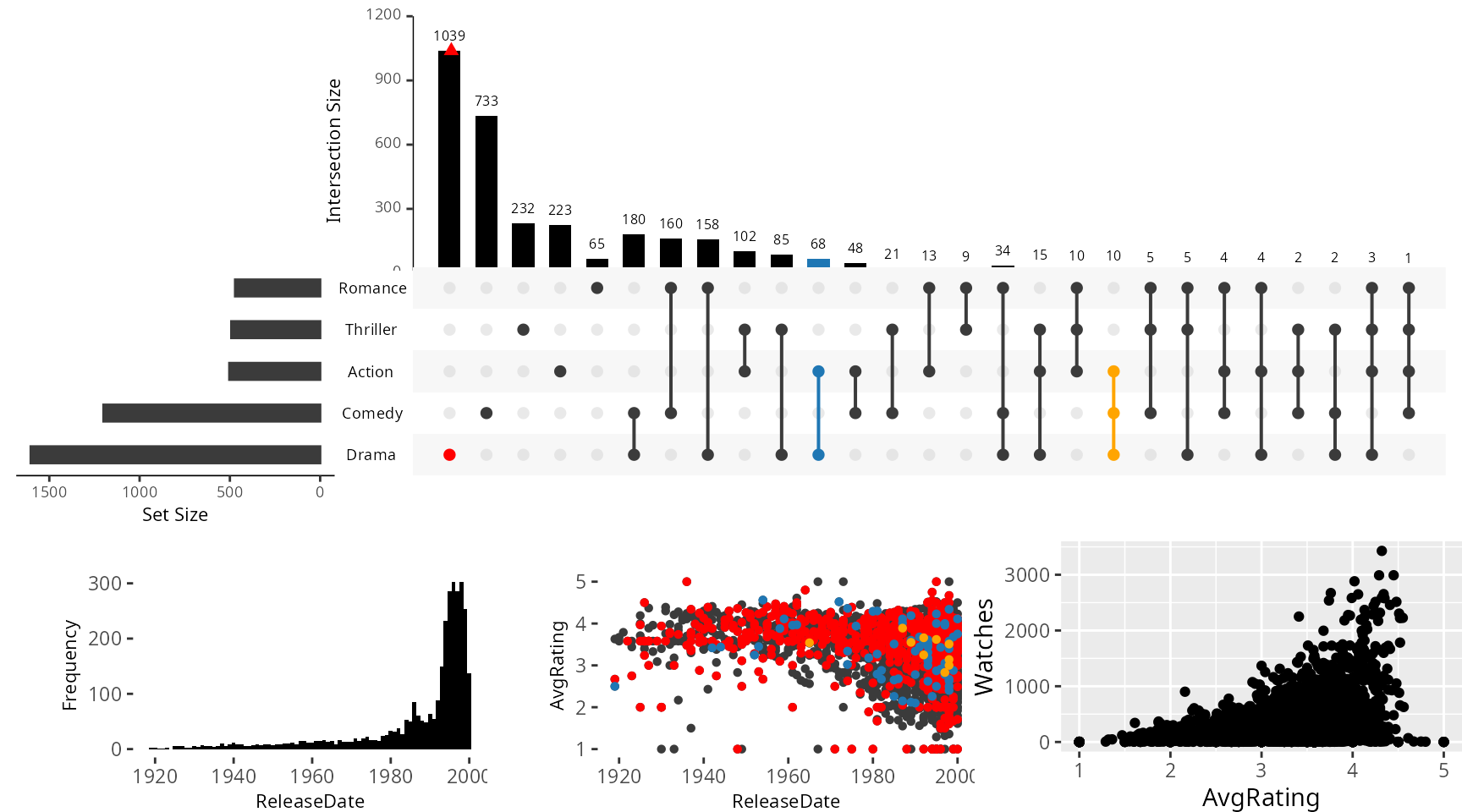
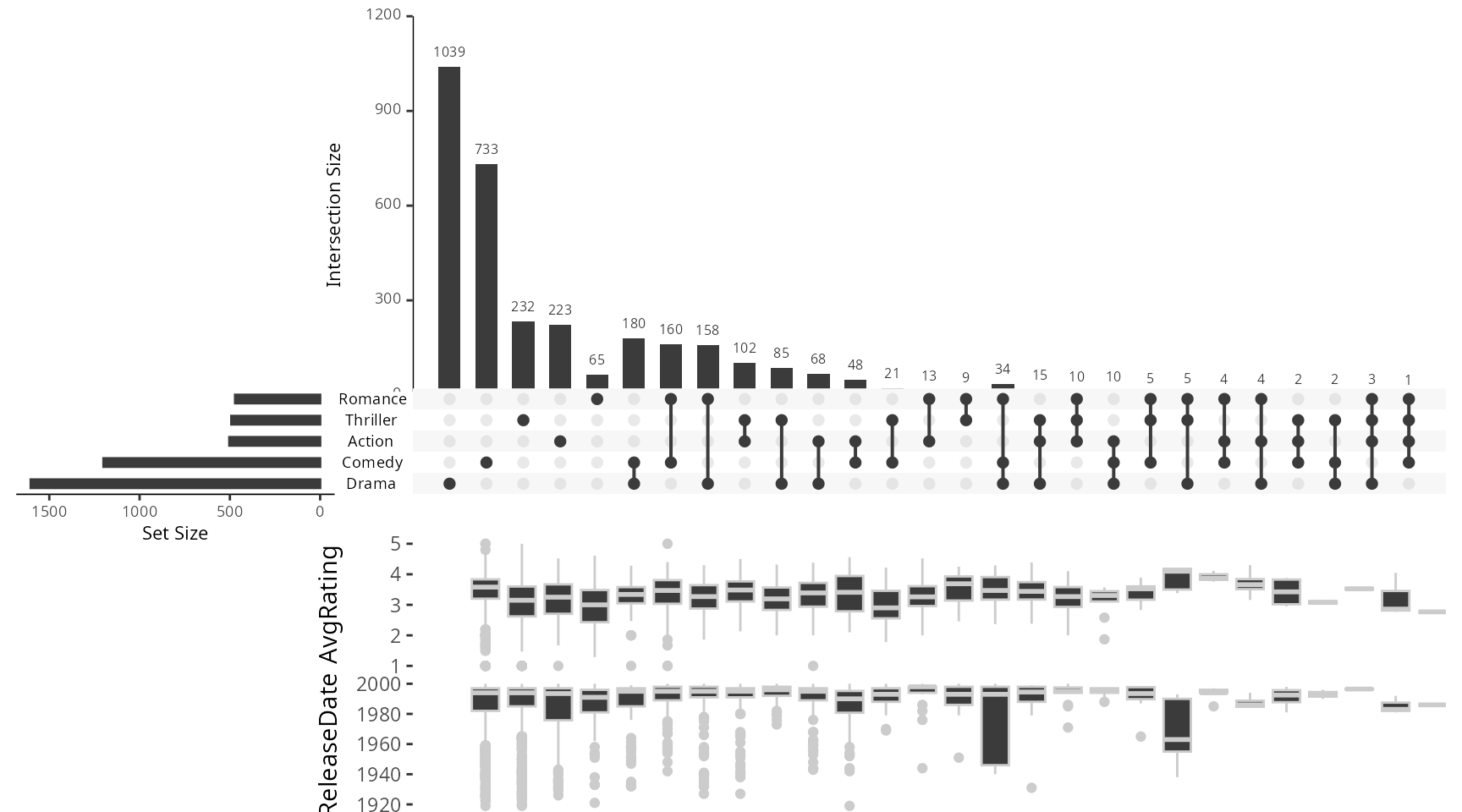
Example 5: Intersection Box Plots
Box plots that show the distribution of an attribute across all
intersections. Can display a maximum of two box plot summaries at once.
The boxplot.summary parameter takes a vector of one or two
attribute names.
## Warning in scale_x_discrete(limits = plot_lims, expand = c(0, 0)): Continuous limits supplied to discrete scale.
## ℹ Did you mean `limits = factor(...)` or `scale_*_continuous()`?
## Continuous limits supplied to discrete scale.
## ℹ Did you mean `limits = factor(...)` or `scale_*_continuous()`?