To further streamline your development process, a collection of Addins has been designed to integrate with RStudio. These Addins provide convenient shortcuts and tools for common tasks.
These Addins enhance the RStudio development workflow by providing quick access to essential tasks and enabling background execution, allowing for better transitions between coding and task management.
This guide shows Addins available for Rhino.
Addins
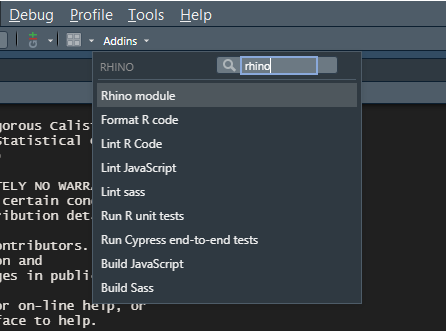
RStudio Addins provide a mechanism for executing R functions interactively from within the RStudio IDE either through keyboard shortcuts, or through the Addins menu.
Available Addins
Create a new Rhino Module
Jump start your module development by creating a new R script document with a Rhino module template. This Addin sets the foundation for your module structure, letting you dive straight into coding.
Format R Code
Uses the styler package to automatically format R script. This Addin ensures consistency and readability.
Lint R Code
Uses the lintr package to check all R sources for style errors. Identify and address potential issues in your R scripts with ease.
Run R Tests
Uses the {testhat} package to run all unit tests in
tests/testthat directory. Maintain your functions and
components reliability.
Build JavaScript
Simplify the process of building JavaScript files using Babel and
Webpack. Builds the app/js/index.js file into
app/static/js/app.min.js. Choose to watch for changes,
automating the build process whenever you save the JavaScript file.
Build Sass Styles
Effortlessly build Sass styles using Dart Sass or the
sass R package. It builds the
app/styles/main.scss file into
app/static/css/app.min.css. Opt to watch for changes,
allowing for automatic rebuilding of style sheets.
Lint JavaScript
Runs ESLint on the JavaScript sources in the
app/js directory. It performs linting on JavaScript files
with ease. Opt to fix issues automatically for fixing it directly.