Developing Patterns - overview
To develop a pattern for use with gridpattern (and packages that use it such as ggpattern) you will need to:
- Decide whether this is a geometry-based pattern or an array-based pattern.
- Create a function with the required arguments and return value
- Use
options()to let gridpattern know that a certain pattern name should be delegated to your function.
This vignette shows how to:
- write a
create_pattern()function of the correct signature for a geometry-based pattern or array-based pattern - Instruct gridpattern on where to find this user-defined pattern
Pattern Classification - geometry-based and array-based
There are only 2 high-level classes of pattern supported by
gridpattern - geometry-based and array-based.
Geometry-based patterns create a series of geometry
objects and trim them (using sf::st_intersection(),
gridGeometry::polyclipGrob(),
gridpattern::clippingPathGrob(), etc) to be within the
boundary of the grob. For example, the ‘stripes’ pattern in
gridpattern is a series of equally spaced rectangular
polygons.
Array-based patterns are RGBA image arrays. Any
supplied image will be processed by gridpattern to ensure
it is masked to only apply to the area within the grob’s boundary.
{ggpattern} Aesthetics -
Descriptions and Defaults
Although custom gridpattern pattern parameters need not limit itself to the set of aesthetics provided by ggpattern doing so may make your pattern more useful for others:
{ggpattern} aesthetic summary - click to open/close
| aesthetic | description | default | possible values |
|---|---|---|---|
pattern |
Name of the pattern to draw | ‘stripe’ | gridpattern::names_pattern |
pattern_alpha |
Alpha | 1 | value in range [0, 1] or NA
|
pattern_angle |
Rotation angle (entire pattern) | 30 | angle in degrees |
pattern_aspect_ratio |
Aspect ratio adjustment | NA | usual range [0.01, 10] |
pattern_colour |
Stroke colour | ‘grey20’ | colour |
pattern_density |
Approx. fraction of area the pattern fills | 0.2 | value in range [0, 1] |
pattern_filename |
Image filename/URL | ’’ | Filename/URL |
pattern_fill2 |
Second fill colour | ‘#4169E1’ | colour |
pattern_fill |
Fill colour | ‘grey80’ | colour |
pattern_filter |
Image scaling filter | ‘lanczos’ | magick::filter_types |
pattern_frequency |
Frequency | 0.1 | |
pattern_gravity |
Image placement | ‘center’ | magick::gravity_types |
pattern_grid |
Pattern grid type | ‘square’ | ‘square’, ‘hex’, ‘hex_circle’ |
pattern_key_scale_factor |
Scale factor for pattern in legend | 1 | |
pattern_linetype |
Stroke linetype | 1 | linetype |
pattern_linewidth |
Stroke linewidth | 1 | linewidth |
pattern_option_1 - 5 |
Generic options for expansion | 0 | |
pattern_orientation |
Orientation | ‘vertical’ | ‘vertical’, ‘horizontal’, ‘radial’ |
pattern_phase |
Phase | 0 | |
pattern_res |
Pattern resolution (pixels per inch) | NA | |
pattern_rot |
Rotation angle (shape within pattern) | 0 | angle in degrees |
pattern_scale |
Scale | 1 | Multiplier |
pattern_shape |
Plotting shape | 1 | shapes |
pattern_size |
Size factor (e.g. fontsize) | 1 | fontsize |
pattern_spacing |
Spacing between repetitions of pattern | 0.05 | value in range [0, 1] (snpc units) |
pattern_subtype |
Generic control option | NA | pattern-dependent |
pattern_type |
Generic control option | NA | pattern-dependent |
pattern_xoffset |
Shift pattern along x axis | 0 | value in range [0, 1] (snpc units) |
pattern_yoffset |
Shift pattern along y axis | 0 | value in range [0, 1] (snpc units) |
Note ggpattern may also pass other geom aesthetics of
possible interest such as fill. Also note that
ggpattern will only pass pattern aesthetics values of
length one but if the pattern is called directly by
gridpattern::patternGrob() then the pattern may be passed
pattern parameters of arbitrary length.
Geometry-based pattern functions - Formal Arguments and Return Values
All geometry-based pattern creation functions must:
-
Have the exact function signature:
function(params, boundary_df, aspect_ratio, legend)-
params- parameters for the pattern (the aesthetics) e.gpattern_fill -
boundary_df- data.frame containing polygon information i.e. Thepolygon_dfformat. -
aspect_ratio- the best guess that gridpattern / ggpattern is able to make as to the aspect ratio of the viewport in which this pattern is being rendered. -
legendlogical value to indicate whether or not this function is being called to render a key legend or the in-place geom fill.
-
Return a grid grob object. This can be any valid grob including a
grid::grobTree(). The user should make sure it lies within the boundary represented byboundary_dfeither by clipping with functions likesf::st_intersection(),gridGeometry::polyclipGrob(),gridpattern::clippingPathGrob(), etc. or using bounded grob functions likegridpattern::patternGrob()orgrid::polygonGrob().
Array-based pattern functions - Formal Arguments and Return Values
All array-based pattern creation functions must:
- Have the exact function signature:
function(width, height, params, legend)-
width,height- dimensions of the bounding box of the geom area -
params- parameters from the geom (the aesthetics) e.gpattern_fill -
legendlogical value to indicate whether or not this function is being called to render a key legend or the in-place geom fill.
-
- Return a 3D array of RGBA values (all values in the range [0, 1]).
gridpatternitself will mask this image so that it only applies to the area within the grob’s boundary.
The polygon_df data.frame
format
The polygon_df is a very simple data.frame format to
contain polygon values. This is used to pass the coordinates of the geom
boundary from the geom to the pattern generating function.
It contains only ‘x’ and ‘y’ columns for the coordinates, and an ‘id’ column used to signify which polygon the coordinates belong to.
The following polygon_df data.frame contains 2
polygons:
| x | y | id |
|---|---|---|
| 0 | 0 | 1 |
| 1 | 0 | 1 |
| 1 | 1 | 1 |
| 0 | 1 | 1 |
| 0 | 0 | 2 |
| 2 | 0 | 2 |
| 2 | 1 | 2 |
| 0 | 1 | 2 |
Associating a function with
{gridpattern} pattern name
There are two global option() values which can be set -
one for geometry-based patterns, and the other for array-based
patterns.
The global values should point to a named list, where the names are
the pattern names you want to use within gridpattern, and
the named values are the actual functions. Note for
backwards-compatibility with the original ggpattern
system these options start with ggpattern instead of
gridpattern.
options(ggpattern_array_funcs    = list(your_pattern_name = your_pattern_function))
options(ggpattern_geometry_funcs = list(your_pattern_name = your_pattern_function))
Pattern names must be different from any of the builtin patterns included in gridpattern.
Example geometry-based pattern #1 (recreate polygon)
All geometry-based pattern creation functions must:
- Have the exact function signature:
function(params, boundary_df, aspect_ratio, legend)-
params- parameters from the geom (the aesthetics) e.gpattern_fill -
boundary_df- data.frame containing polygon information i.e. Thepolygon_dfformat. -
aspect_ratio- the best guess that gridpattern / ggpattern is able to make as to the aspect ratio of the viewport in which this pattern is being rendered. -
legendlogical value to indicate whether or not this function is being called to render a key legend or the in-place geom fill.
-
- Return a grid grob bounded by the boundary represented by
boundary_df(including grid structures like agrid::grobTree()).
For this example we’ll create a simple single color fill pattern
based on grid::polygonGrob() called ‘polygon’.
create_pattern_polygon <- function(params, boundary_df, aspect_ratio, legend = FALSE) {
    x <- boundary_df$x
    y <- boundary_df$y
    id <- boundary_df$id

    alpha <- ifelse(is.na(params$pattern_alpha), 1, params$pattern_alpha)
    gp <- grid::gpar(alpha = alpha,
                     col = params$pattern_colour,
                     fill = params$pattern_fill,
                     lty = params$pattern_linetype,
                     lwd = params$pattern_linewidth)

    grid::polygonGrob(x = x, y = y, id = id, default.units = "npc", gp = gp)
}
A global option ggpattern_geometry_funcs is a named list
which contains geometry-based pattern creating functions to use outside
of ggpattern.
The name used in this list corresponds to the
pattern name used with the geom - in this case we will be
using pattern = 'polygon'.
grid.pattern("polygon", fill = "red", size = 4, linetype = "dashed",
             x = c(0.05, 0.05, 0.305, 0.305), y = c(0.05, 0.305, 0.305, 0.05))
grid.pattern("polygon", fill = "green", alpha = 0.2,
             x = c(0.35, 0.35, 0.65, 0.65), y = c(0.35, 0.65, 0.65, 0.35))
grid.pattern("polygon", fill = "blue", colour = "grey",
             x = c(0.7, 0.7, 1.0, 1.0), y = c(0.7, 1.0, 1.0, 0.7))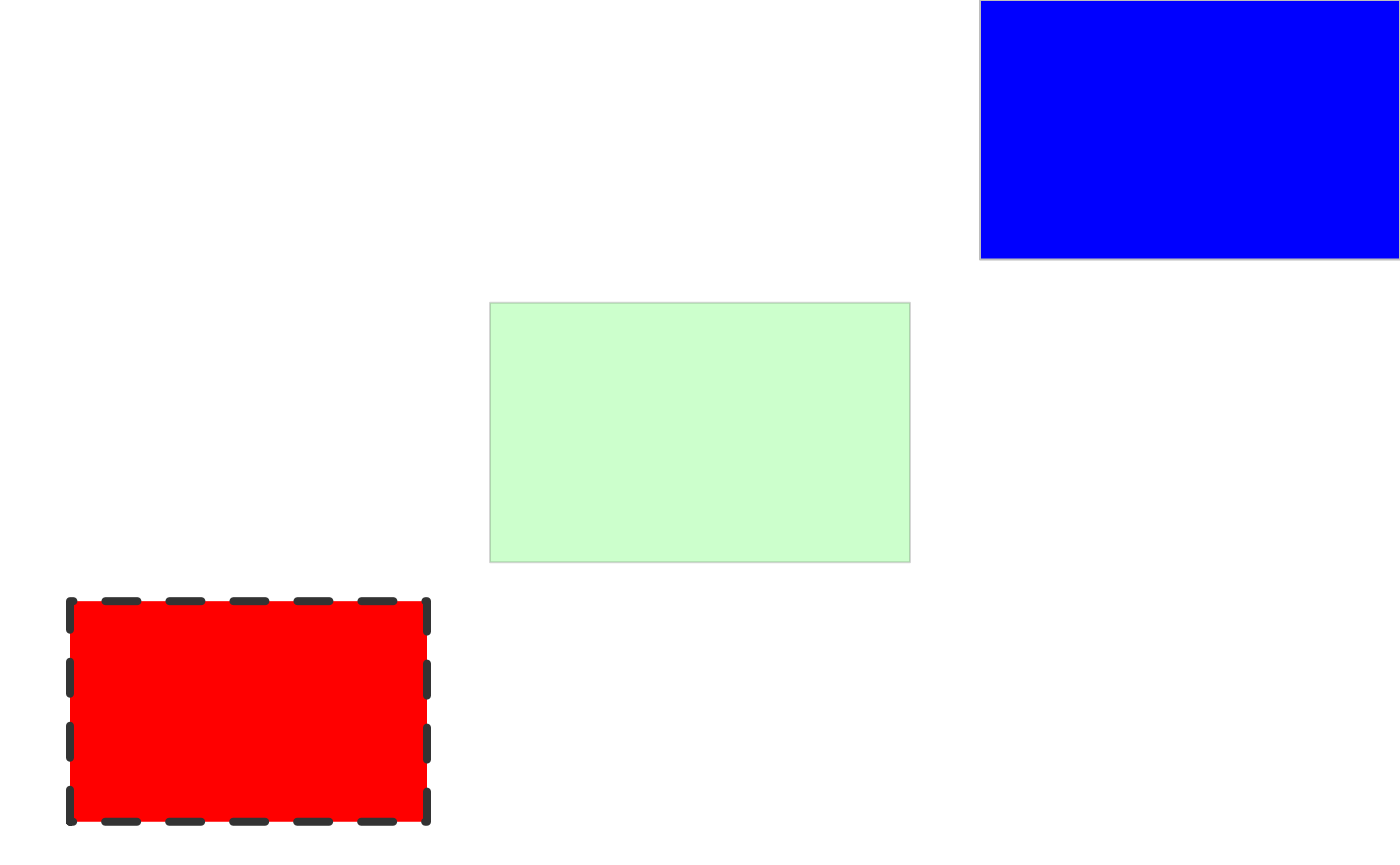
Example geometry-based pattern function #2 (using other patterns)
All geometry-based pattern creation functions must:
- Have the exact function signature:
function(params, boundary_df, aspect_ratio, legend)-
params- parameters from the geom (the aesthetics) e.gpattern_fill -
boundary_df- data.frame containing polygon information i.e. Thepolygon_dfformat. -
aspect_ratio- the best guess that gridpattern / ggpattern is able to make as to the aspect ratio of the viewport in which this pattern is being rendered. -
legendlogical value to indicate whether or not this function is being called to render a key legend or the in-place geom fill.
-
- Return a grid grob bounded by the boundary represented by
boundary_df(including grid structures like agrid::grobTree()).
For this example we’ll create an example that re-uses the pre-existing ‘stripe’, ‘circle’, and ‘gradient’ patterns and combines them into a new ‘complex’ pattern.
create_pattern_complex <- function(params, boundary_df, aspect_ratio, legend = FALSE) {
    args <- as.list(params)
    args <- args[grep("^pattern_", names(args))]
    args$x <- boundary_df$x
    args$y <- boundary_df$y
    args$id <- boundary_df$id
    args$prefix <- ""

    args_stripe <- args
    args_stripe$pattern <- "stripe"
    args_stripe$pattern_density <- 0.5 * args$pattern_density
    args_stripe$pattern_spacing <- 2 * args$pattern_spacing
    grob_stripe <- do.call(gridpattern::patternGrob, args_stripe)

    args_circle <- args
    args_circle$pattern <- "regular_polygon"
    args_circle$pattern_shape <- c("circle", "null")
    args_circle$pattern_yoffset <- args$pattern_spacing + args$pattern_yoffset
    args_circle$pattern_type = "horizontal"
    grob_circle <- do.call(gridpattern::patternGrob, args_circle)

    args_gradient <- args
    args_gradient$pattern <- "gradient"
    args_gradient$pattern_fill <- "#00000070"
    args_gradient$pattern_fill2 <- "#FFFFFF70"
    args_gradient$pattern_orientation <- "vertical"
    grob_gradient <- do.call(gridpattern::patternGrob, args_gradient)

    grid::grobTree(grob_stripe, grob_circle, grob_gradient)
}
A global option ggpattern_geometry_funcs is a named list
which contains geometry-based pattern creating functions to use outside
of ggpattern.
The name used in this list corresponds to the
pattern name used with the geom - in this case we will be
using pattern = 'complex'.
grid.pattern("complex", fill = "red", angle = 45, spacing = 0.05, density = 0.3,
             x = c(0.0, 0.0, 0.3, 0.3), y = c(0.0, 0.3, 0.3, 0.0))
grid.pattern("complex", fill = "green", angle = 45, spacing = 0.2, density = 0.2,
             x = c(0.35, 0.35, 0.65, 0.65), y = c(0.35, 0.65, 0.65, 0.35))
grid.pattern("complex", fill = "blue", angle = 45, spacing = 0.1, density = 0.3,
             x = c(0.7, 0.7, 1.0, 1.0), y = c(0.7, 1.0, 1.0, 0.7))
grid::grid.polygon(x = c(0.0, 0.0, 0.3, 0.3, 0.35, 0.35, 0.65, 0.65, 0.7, 0.7, 1.0, 1.0),
                   y = c(0.0, 0.3, 0.3, 0.0, 0.35, 0.65, 0.65, 0.35, 0.7, 1.0, 1.0, 0.7),
                   id = rep(1:3, each = 4),
                   gp = grid::gpar(col = "black", fill = NA, lwd=4))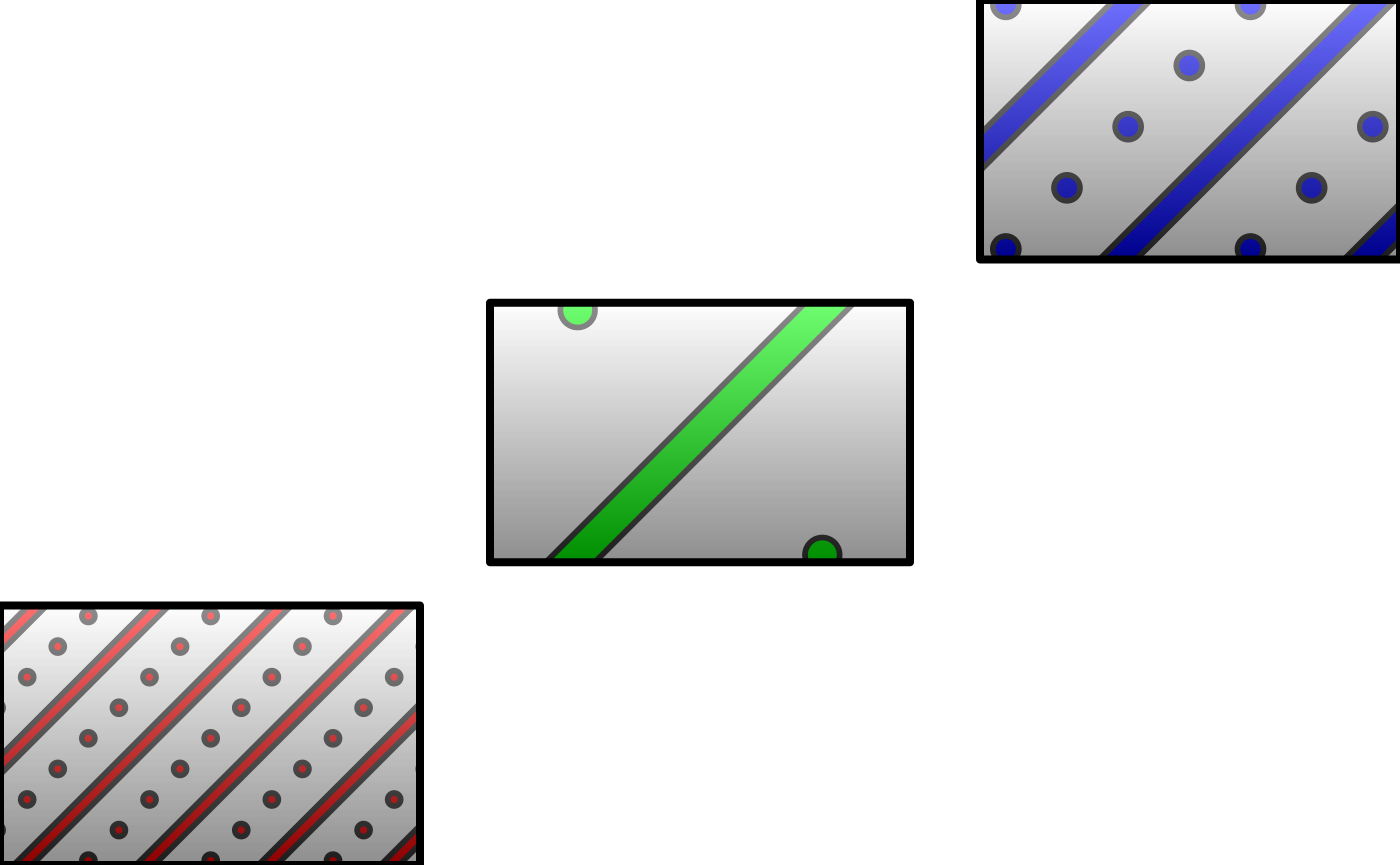
Example array-based pattern function
All array-based pattern creation functions must:
- Have the exact function signature:
function(width, height, params, legend)-
width,height- dimensions of the bounding box of the geom area -
params- parameters from the geom (the aesthetics) e.gpattern_fill -
legendlogical value to indicate whether or not this function is being called to render a key legend or the in-place geom fill.
-
- Return a 3D array of RGBA values (all values in the range [0, 1]).
For this example we’ll create a simple example that cycles through RGBA values.
Parameters for this pattern:
-
pattern_typeis used to distinguish between source data for the pattern
Note: This pattern exploits vector recyling in the creation of the RGBA array, and as dimensions change the alignment of the R, G, B and A planes will not remain in a fixed relationship. Thus if you change the shape of the rendered image, you will change the nature of the pattern.
create_pattern_simple <- function(width, height, params, legend) {

  # Ensure the selected pattern is sane.
  choice <- params$pattern_type
  if (is.null(choice) || is.na(choice) || !is.character(choice)) {
    choice <- 'a'
  }

  # Choose the values with which to fill the array
  values <- switch(
    choice,
    a = rep(c(0, 1, 0, 1, 1, 0, 0, 1, 1, 1), each = 3),
    b = rep(c(1, 0, 0, 1, 0.5, 0.5, 1, 1, 0, 0, 0, 0, 0, 0.5), each = 7),
    c = rep(seq(0, 1, 0.05), each = 7),
    rep(c(0, 1, 0, 1, 1, 0, 0, 1, 1, 1), each = 3)
  )
  # Create an RGBA array of the requested dimensions
  simple_array <- array(values, dim = c(height, width, 4))

  simple_array
}
A global option ggpattern_array_funcs is a named list
which contains geometry-based pattern creating functions to use outside
of ggpattern.
The name used in this list corresponds to the
pattern name used with the geom - in this case we will be
using pattern = 'simple'.
grid::grid.polygon(x = c(0, 0, 1, 1), y = c(0, 1, 1, 0),
                   gp = grid::gpar(col=NA, fill="grey"))
grid.pattern("simple", type = "a",
             x = c(0.0, 0.0, 0.3, 0.3), y = c(0.0, 0.3, 0.3, 0.0))
grid.pattern("simple", type = "b",
             x = c(0.35, 0.35, 0.65, 0.65), y = c(0.35, 0.65, 0.65, 0.35))
grid.pattern("simple", type = "c",
             x = c(0.7, 0.7, 1.0, 1.0), y = c(0.7, 1.0, 1.0, 0.7))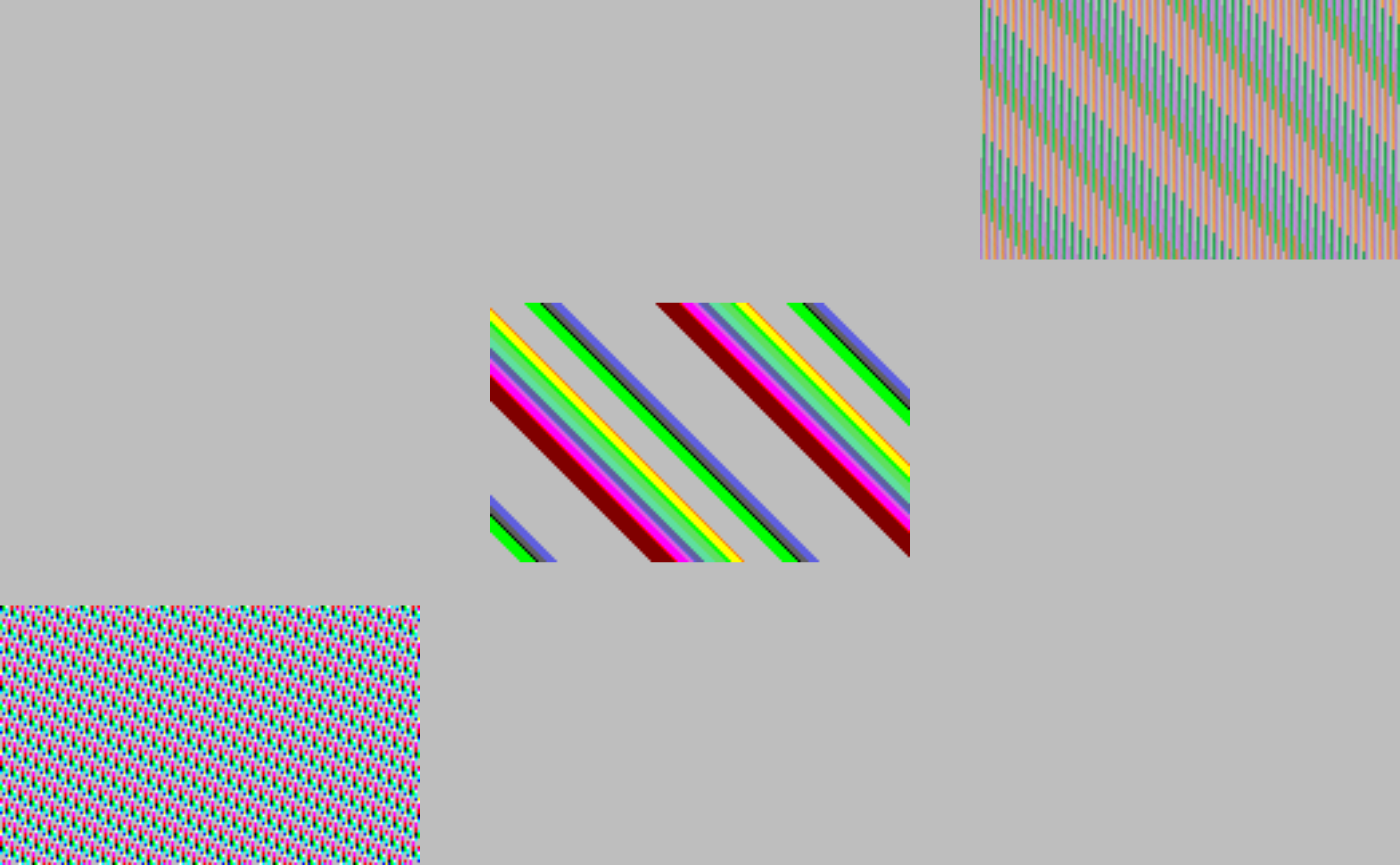
Other examples
The ggpattern package contains a vignette on developing gridpattern / ggpattern patterns with a few more examples: https://coolbutuseless.github.io/package/ggpattern/articles/
Also the gridpattern source contains the full source code for 19 patterns: https://github.com/trevorld/gridpattern/tree/main/R